

PRODUCT MANUAL · v1.3
产品使用手册 · v1.3
DART Product Manual
DART 产品使用手册
Two rulesets, one screening: the path-matching ruleset decides “what counts as a violation”, the scoring ruleset decides “how severe it is and what to do”. This manual explains both rulesets end to end — how they are built, how they are calculated, and how to use them in the console and the API.
两套彼此独立的规则集完成一次合规筛查:路径匹配规则集判定「什么算违规」,打分映射规则集判定「有多严重、该怎么处置」。本手册说明这两套规则集的构成与算法,以及在控制台和 API 上的完整使用方式。
Screenshots are from the AML console v2 — the DART console ships the same screens.截图来自 AML 控制台 v2 —— DART 控制台为相同界面。
01How a screening runs筛查是怎么跑的
The big picture first: the steps a screening goes through, and where each ruleset plugs in.
先建立整体印象:一次筛查经过哪几步,两套规则集分别插在哪里。
You submit an address (KYA) or a transaction (KYT). The system runs a path investigation against the on-chain data layer, tracing the address's funds upstream and downstream for several hops to produce a fund-flow graph. Then the two rulesets take over in sequence: the path-matching ruleset finds every violation on this graph, and the scoring ruleset converts those hits into a 0–100 score and a disposition.
你提交一个地址(KYA)或一笔交易(KYT)。系统先向链上数据层发起一次路径调查,把这个地址的资金往上游、下游各追若干跳,得到一张资金流图。随后两套规则集依次介入:路径匹配规则集在这张图上找出所有违规命中,打分映射规则集把这些命中折算成一个 0–100 的分数和一个处置判定。
Input               Step 1               Ruleset A            Ruleset B           Output
Address / TX hash → Path investigation  → Path matching     → Scoring mapping   → Score + verdict
Ethereum / Tron     Expand hop-by-hop     Match each path     Direction × hops    Pass / Review /
USDT / USDC         fund-flow graph +     against rules,      × severity ×       EDD / Block
                    counterparty labels   produce hit list    share of funds
输入                第一步              规则集 A            规则集 B            输出
地址 / 交易哈希  →   路径调查        →   路径匹配        →   打分映射        →   分数 + 判定
Ethereum/Tron       按跳数展开          逐条路径匹配        按方向、跳数、       通过 / 复核 /
USDT/USDC           资金流图 +          规则,产出           严重度、资金占比     加强尽调 / 拦截
                    对手方标签          命中列表            折算成分数
KEY DIFFERENCE — The path-matching ruleset only answers yes / no — does this path violate a rule? It never produces a score. The score comes entirely from the scoring ruleset. So the same hit list produces different scores and dispositions under a different scoring ruleset — while the hit list itself never changes.关键区别 —— 路径匹配规则集只回答是/否——这条路径有没有违规。它不产生分数。分数完全由打分映射规则集决定。所以同一批命中,换一套打分规则集就会得到不同的分数和判定,而命中列表本身不变。
02The two rulesets at a glance两套规则集的分工
On the “Rulesets” page, four cards correspond to the two kinds of rulesets.
在「规则集」页面,四张卡片对应两类规则集。
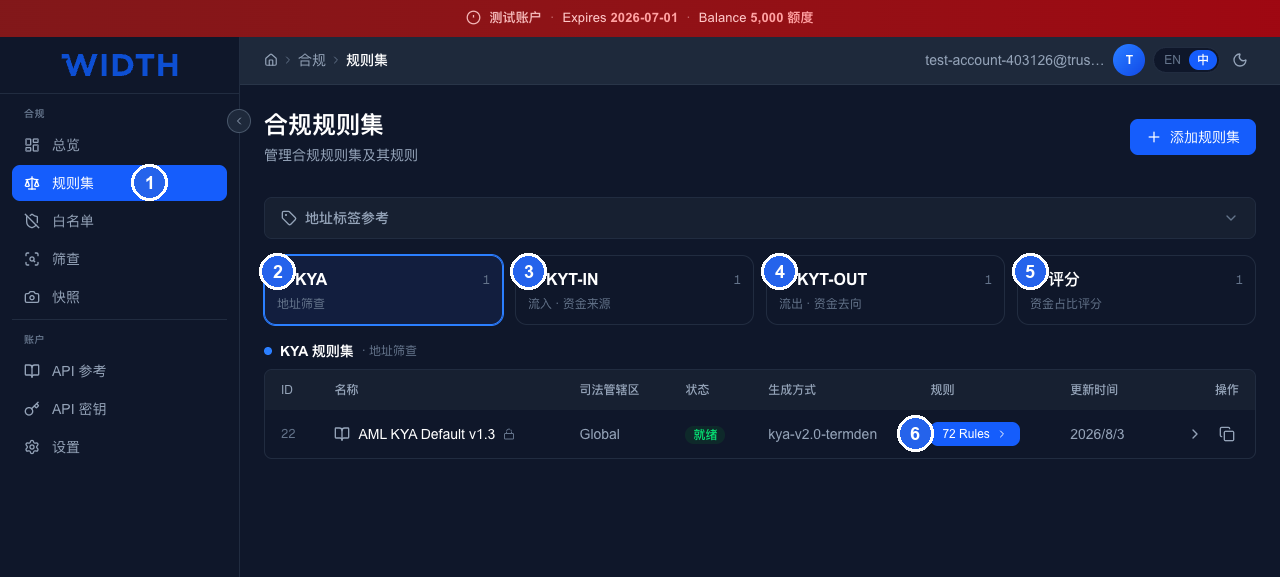
Compliance rulesets page: left — the Rulesets entry; KYA / KYT-IN / KYT-OUT — path-matching rulesets; Scoring — the scoring ruleset; the rule count opens the full rule list.
合规规则集页面:左侧「规则集」入口;KYA / KYT-IN / KYT-OUT —— 路径匹配类;评分 —— 打分映射类;规则条数,点进去查看该规则集下的全部规则。
- Left — the “Rulesets” entry
- 左侧「规则集」入口
- KYA — address screening, path-matching type
- KYA —— 地址筛查,路径匹配类
- KYT-IN — transaction inflow side (source of funds), path-matching type
- KYT-IN —— 交易流入侧(资金来源),路径匹配类
- KYT-OUT — transaction outflow side (destination of funds), path-matching type
- KYT-OUT —— 交易流出侧(资金去向),路径匹配类
- Scoring — fund-attribution scoring, scoring-mapping type
- 评分 —— 资金占比评分,打分映射类
- Rule count — click through to see all rules under that ruleset
- 规则条数,点进去查看该规则集下的全部规则
The first three cards are the same kind of thing (path-matching); the fourth is a different kind (scoring-mapping).
前三张卡片是同一类东西(路径匹配),第四张是另一类(打分映射)。
| Path-matching ruleset路径匹配规则集 | Scoring ruleset打分映射规则集 | |
|---|---|---|
| Type类型标识 | kya / kyt_in / kyt_out | scoring |
| Question it answers回答的问题 | Does this path violate a rule? Which one?这条路径违规吗?违反哪条? | How severe is it overall? What should we do?整体有多严重?该怎么处置? |
| Input输入 | Fund-flow graph + label of every node资金流图 + 每个节点的标签 | Hit list from the previous step + address total on-chain flow上一步产出的命中列表 + 地址链上总流量 |
| Output输出 | Hit list — rule, severity, hop, amount命中列表(规则、严重度、跳数、金额) | 0–100 score + disposition tier0–100 分数 + 判定档位 |
| Contents内容形态 | 72 rules, each with a condition expression72 条规则,每条含条件表达式 | A contribution matrix + weights + tier thresholds一张贡献矩阵 + 权重 + 档位阈值 |
| Built-in version内置版本 | AML KYA / KYT-IN / KYT-OUT Default v1.3AML KYA / KYT-IN / KYT-OUT Default v1.3 | AML Fund-Attribution Scoring Default v1.0AML Fund-Attribution Scoring Default v1.0 |
| Used per screening每次筛查用几套 | 1 (auto-matched by KYA / KYT and direction)1 套(按 KYA/KYT 及方向自动匹配) | 11 套 |
| Customizable可否自定义 | Clone a built-in ruleset, then edit可克隆内置规则集后修改 | Clone, then adjust matrix and thresholds可克隆后调整矩阵与阈值 |
03Path-matching rulesets路径匹配规则集
How the 72 rules are organized, and what a single rule is made of.
72 条规则如何组织,以及一条规则由什么构成。
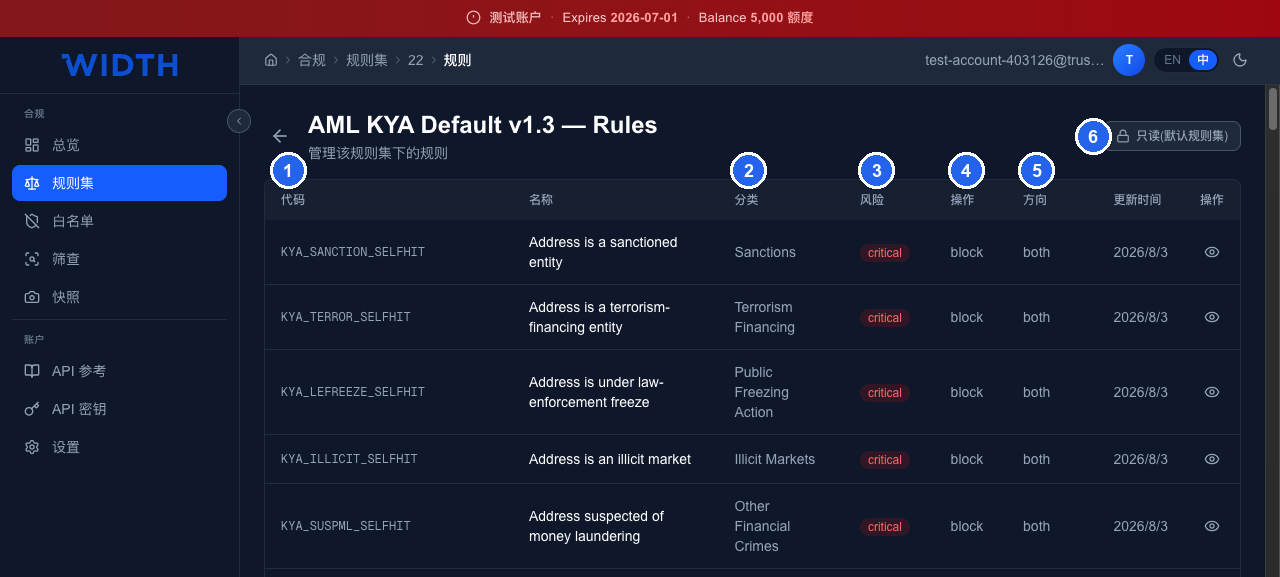
Rule list: code (unique id, echoed verbatim in results) · category (risk class) · risk (severity, converted to a weight when scoring) · action (suggested disposition) · direction (inflow / outflow / both).
规则列表:代码(唯一标识,命中后原样出现在结果里)· 分类(风险类别)· 风险(严重度,打分时换算成权重)· 操作(建议处置动作)· 方向(对流入侧、流出侧还是双向生效)。
- Code — unique rule id, echoed verbatim in results
- 代码 —— 规则唯一标识,命中后原样出现在结果里
- Category — risk class that decides which scenario it belongs to
- 分类 —— 风险类别,决定它属于哪个场景
- Risk — severity, converted to a weight when scoring
- 风险 —— 严重度,打分时换算成权重
- Action — suggested disposition
- 操作 —— 建议处置动作
- Direction — applies to inflow, outflow or both
- 方向 —— 对流入侧、流出侧还是双向生效
- Built-in rulesets are read-only — clone one before editing
- 内置规则集为只读,如需修改请先克隆一份
The five rules in the screenshot are all “self-hit” rules: the address itself carries sanctions, terrorism-financing, law-enforcement-freeze and similar labels.
图中五条都是「自身命中」型规则:地址自己带了制裁、恐怖融资、执法冻结等标签。
What a rule is made of
一条规则由什么构成
Each rule is a set of conditions plus a scope. Real built-in rules (from production) look like this:
每条规则是一组条件,加上生效范围。真实的内置规则(取自生产库)长这样:
// 自身命中:地址自己就是制裁实体。跳数 0,max_hops = -1 表示「只看地址本身」
// Self-hit: the address itself is a sanctions entity. 0 hops, max_hops = -1 = "the address only"
KYA_SANCTION_SELFHIT      critical / block / 0..-1
  [{ "parameter": "primary_category", "operator": "==", "value": "Sanctions" }]

// 直接暴露:一跳之内的对手方是制裁实体,且金额 > 10 USDT/USDC
// Direct exposure: a counterparty within 1 hop is a sanctions entity, amount > 10 USDT/USDC
KYA_SANCTION_EXPOSURE     critical / block / 1..1
  [{ "parameter": "primary_category", "operator": "==", "value": "Sanctions" },
   { "parameter": "amount",           "operator": ">",  "value": 10, "unit": "USDT/USDC" }]

// 分层暴露:2 跳,且该路径的风险资金占比 >= 5%
// Layered exposure: 2 hops, and the path's risk funds share >= 5%
KYA_SANCTION_EXPOSURE_H2  critical / block / 2..2
  [{ "parameter": "primary_category", "operator": "==", "value": "Sanctions" },
   { "parameter": "amount",           "operator": ">",  "value": 10, "unit": "USDT/USDC" },
   { "parameter": "risk_rate",        "operator": ">=", "value": 5 }]
How amount is read. A rule's amount condition is compared against the path's smallest edge — the bottleneck, i.e. the most risk-tainted funds that could travel the whole path end to end. So amount > 1000 does not match a 500 → b 1200 → c (only 500 could get through), but does match a 2000 → b 3000 → c. The same figure is what a hit reports as its exposure, and it is the numerator of risk_rate; the denominator is the path's last edge — what the terminal address actually received.
amount 怎么比。规则的金额条件比较的是路径上最小的一条边——瓶颈,即能贯通整条路径的最大受污染资金。所以 amount > 1000 不会命中 a 500 → b 1200 → c(只有 500 能穿过去),但会命中 a 2000 → b 3000 → c。命中结果里显示的敞口(exposure)就是这个数,它也是 risk_rate 的分子;分母是路径的最后一条边,即终端地址实际收到的金额。
The three rule shapes
三种规则形态
The 72 rules are combinations of three shapes. Understand these three and you understand the whole ruleset:
72 条规则由三种形态组合而成,理解这三种就理解了整套规则集:
| Shape形态 | Code suffix代码后缀 | Hops跳数范围 | Meaning含义 |
|---|---|---|---|
| Self-hit自身命中 | _SELFHIT | 0 .. -1 | The screened address / transaction itself carries the risk label. Strongest signal — triggers the top score directly.被筛地址/交易本身带有该风险标签。最强信号,直接触发最高分。 |
| Direct exposure直接暴露 | _EXPOSURE | 1 .. 1 | A direct counterparty within 1 hop carries the label, and the amount (the path's smallest edge) clears the threshold.一跳之内的直接交易对手带有该标签,且金额(路径最小边)超过门槛。 |
| Layered exposure分层暴露 | _EXPOSURE_H2 … _H5 | 2..2 … 5..5 | Indirect linkage 2–5 hops away. The further the hop, the higher the required risk-funds share (≥5% / 10% / 15% / 20%) — distant weak links stay quiet.2–5 跳的间接关联。跳得越远,要求的风险资金占比门槛越高(≥5% / 10% / 15% / 20%),避免远距离弱关联造成误报。 |
Risk categories and rule counts
风险类别与规则条数
The 72 built-in KYA rules span 9 categories:
内置 KYA 规则集的 72 条规则分布在 9 个类别:
| Risk category风险类别 | Rules规则数 | Typical severity典型严重度 |
|---|---|---|
| High-Risk Entities 高风险实体 | 16 | high |
| Cybercrime 网络犯罪 | 12 | high |
| Obfuscation 混淆服务 | 8 | high |
| Sanctions 制裁 | 6 | critical |
| Terrorism Financing 恐怖融资 | 6 | critical |
| Public Freezing Action 执法冻结 | 6 | critical |
| Illicit Markets 非法市场 | 6 | critical |
| Other Financial Crimes 其他金融犯罪 | 6 | critical |
| Gambling 博彩 | 6 | medium |
KYA vs KYT
KYA 与 KYT 的关系
The three path-matching rulesets are structurally identical — all 72 rules — differing only in what they screen:
三套路径匹配规则集内容同构,都是 72 条,区别只在适用对象:
- KYA — screens one address. Traces both its inflow and outflow sides.
- KYA —— 筛查一个地址。追它的流入和流出两侧。
- KYT-IN — screens a transaction's payer: “where did this money come from — is the source clean?”
- KYT-IN —— 筛查一笔交易的付款方,回答「这笔钱从哪来,来源干净吗」。
- KYT-OUT — screens a transaction's payee: “where does this money go — is the destination clean?”
- KYT-OUT —— 筛查一笔交易的收款方,回答「这笔钱去哪了,去向干净吗」。
When screening a transaction you can look at one side only, or choose “both” — the system screens both ends separately and merges the results, taking the higher risk level.
筛查交易时可以只看一侧,也可以选「双向」——系统会分别筛两端再合并结果,取两者中较高的风险等级。
Editing rules in the console
在控制台编辑规则
Built-in rulesets are read-only. Clone one from the ruleset list to get an editable copy that keeps every rule, condition and ★ highlight, then open its Rules page:
内置规则集只读。在规则集列表点 克隆 得到可编辑副本,规则、条件和 ★ 重点标记全部保留;然后打开它的 规则 页:
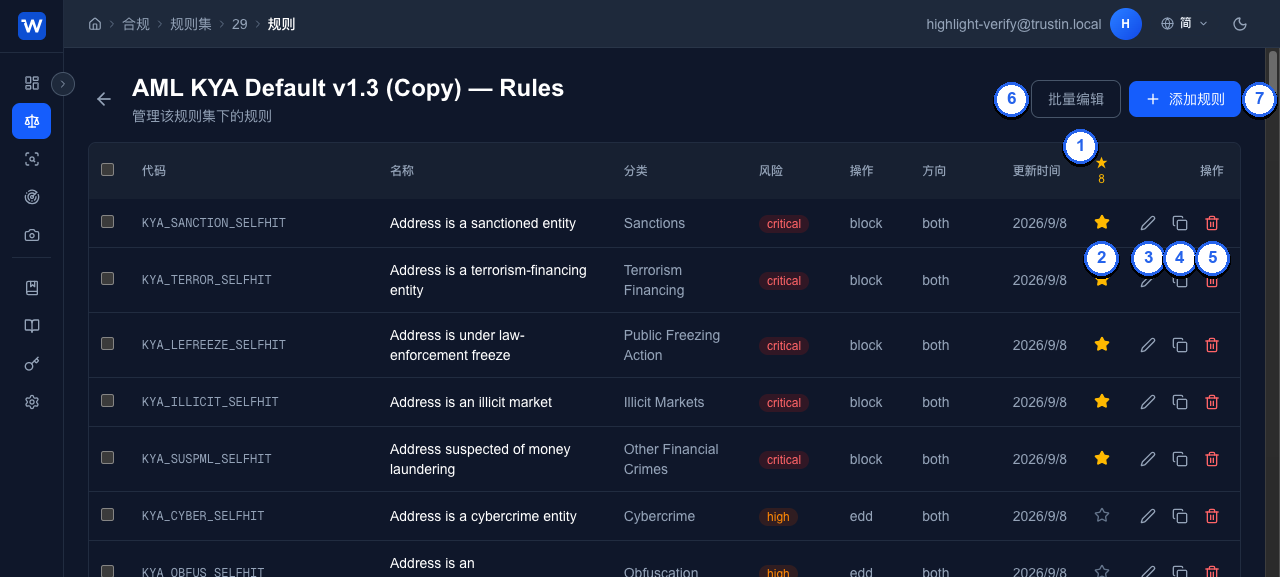
Rules page of a cloned ruleset: the ★ column with the highlighted count in its header · per-row ★ toggle, Edit, Copy and Delete · Bulk Edit and Add Rule in the toolbar.
克隆规则集的规则页:★ 列(表头显示重点规则数)· 每行的 ★ 切换、编辑、复制、删除 · 工具栏的批量编辑与添加规则。
- ★ column — the header counts the ruleset's highlighted rules
- ★ 列 —— 表头统计该规则集的重点规则数
- ★ toggle — mark / unmark this rule as highlighted (see below)
- ★ 切换 —— 标记 / 取消该规则的重点(见下)
- Edit — change any field of the rule
- 编辑 —— 修改该规则的任意字段
- Copy — derive a new rule from this one (next screenshot)
- 复制 —— 以该规则为模板派生新规则(见下图)
- Delete — remove the rule; tick several rows to delete them together
- 删除 —— 删除该规则;勾选多行可批量删除
- Bulk Edit — edit every rule inline and save them together
- 批量编辑 —— 对全部规则逐行修改后一次保存
- Add Rule — the full form: code, name, category, risk level, action, direction, hop band, conditions, reference and ★
- 添加规则 —— 完整表单:编码、名称、类别、风险等级、处置动作、方向、跳数区间、条件、法规引用和 ★
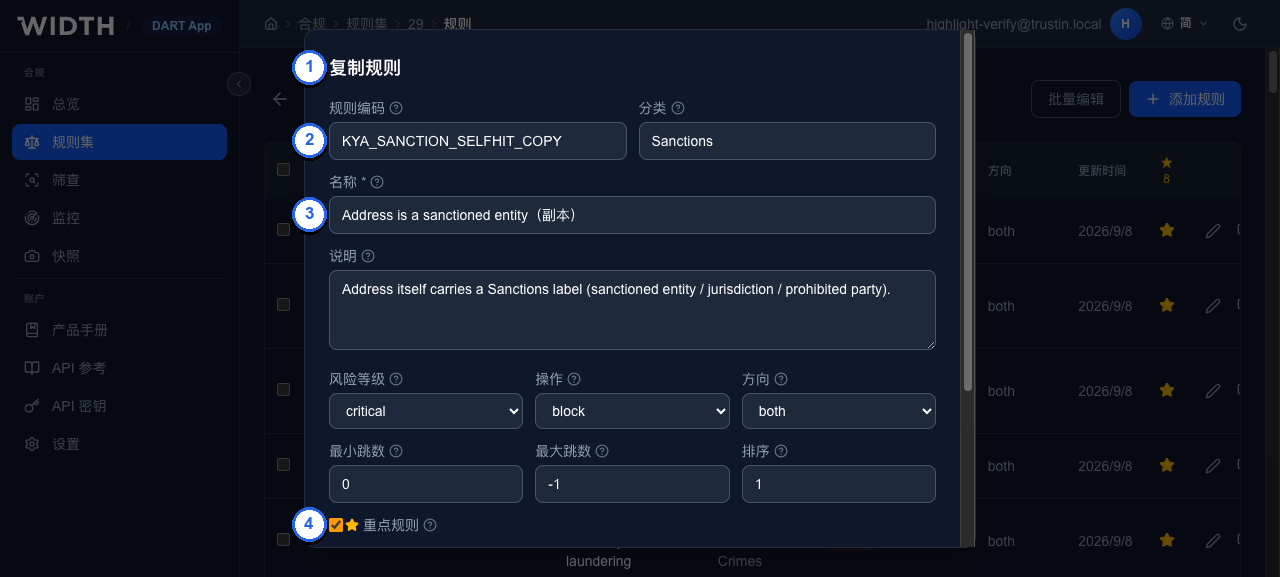
Copy opens “Add Rule” pre-filled from the source rule: code suffixed _COPY, name suffixed “(copy)”, every other field — conditions and ★ included — carried over. Nothing is created until you confirm.
复制会以源规则预填「添加规则」对话框:编码加 _COPY、名称加「(副本)」,其余字段(含条件与 ★)原样带入。确认前不会创建。
- Copy Rule — the same form as Add Rule, titled for the copy
- 复制规则 —— 与添加规则相同的表单,标题标明是复制
- Code — source code +
_COPY; rename before saving if you like - 编码 —— 源编码 +
_COPY,保存前可改 - Name — source name + “(copy)”
- 名称 —— 源名称 + 「(副本)」
- ★ Highlighted — carried over from the source, as are the conditions further down
- ★ 重点规则 —— 随源规则带入;再往下的条件同样原样带入
Highlighted rules (★)
重点规则(★)
A ruleset owner can mark any rule as highlighted. The flag is purely presentational — severity, action and score are unaffected — but wherever results are shown, hits of highlighted rules come first: a ★ pill next to the disposition (“Highlighted rules M/N hit”), a dedicated “Highlighted rules hit” block ahead of the triggered-rule list, a ★ on the rule itself, and a “Highlighted only” filter on the fund-flow graph. The API carries the same information: highlighted on each hit, highlighted_hits plus highlighted_rules_checked / highlighted_rules_hit on the result (v3: highlightSummary), and is_highlighted in rules_summary. Built-in rulesets ship with their zero-tolerance self-hit rules highlighted; a clone inherits the flags and may change them.
规则集所有者可把任意规则标记为重点。这是纯展示属性——严重度、处置动作和分数都不受影响——但在所有结果页面,重点规则的命中都会被优先呈现:判定旁的 ★ 计数(「重点规则命中 M/N」)、位于触发规则列表之前的「重点规则命中」区块、规则上的 ★ 标记,以及资金流图上的「仅重点」筛选。API 同步给出:每条命中的 highlighted,结果上的 highlighted_hits 与 highlighted_rules_checked / highlighted_rules_hit(v3 为 highlightSummary),以及 rules_summary 里的 is_highlighted。内置规则集默认把零容忍的自身命中规则设为重点;克隆会继承标记,之后可自行修改。
04Scoring ruleset打分映射规则集
Converting the hit list into a 0–100 score, then mapping it to a disposition.
把命中列表折算成 0–100 分,再映射成处置判定。
This ruleset contains no “rules” — only a set of parameters. At its core is a contribution matrix: the maximum contribution of each cell, keyed by “fund direction × hop distance × hit severity”.
这套规则集里没有「规则」,只有一组参数。核心是一张贡献矩阵:按「资金方向 × 跳数距离 × 命中严重度」给出每一格的满分贡献值。
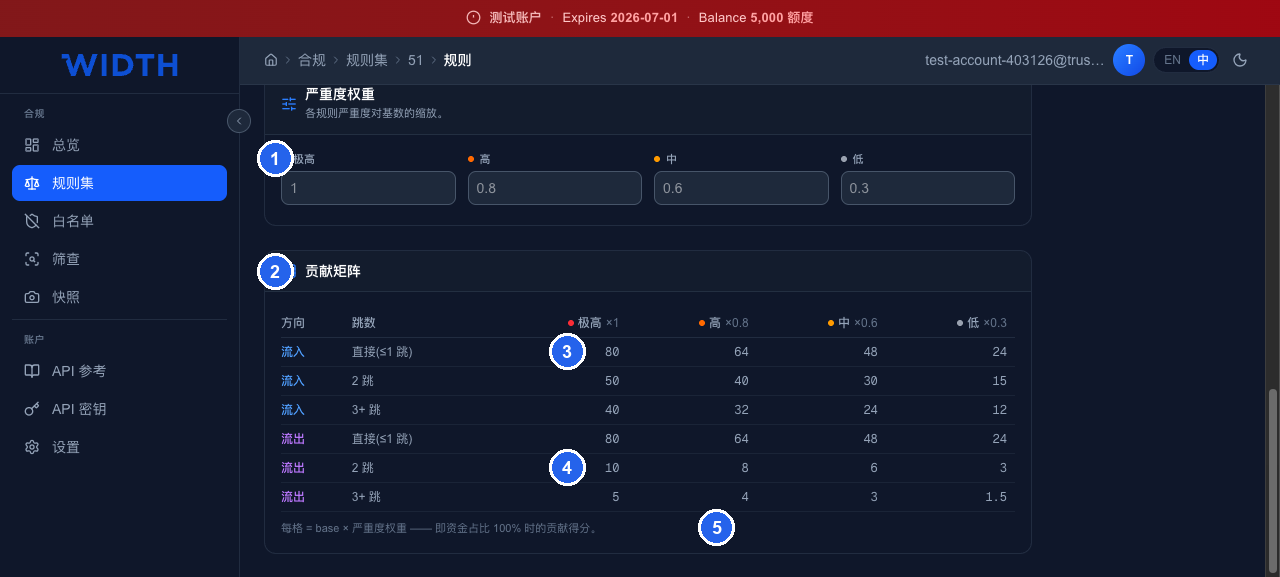
Scoring ruleset configuration: severity weights · the contribution matrix (direction × hops × severity) · inflow direct hit of extreme severity contributes a full 80 points · outflow at 2 hops contributes only 10.
评分规则集配置:严重度权重 · 贡献矩阵(方向 × 跳数 × 严重度)· 流入·直接命中极高风险,满贡献 80 分 · 流出·2 跳同样极高,只有 10 分。
- Severity weights — extreme ×1 · high ×0.8 · medium ×0.6 · low ×0.3
- 严重度权重 —— 极高 ×1、高 ×0.8、中 ×0.6、低 ×0.3
- Contribution matrix — direction × hops × severity
- 贡献矩阵 —— 方向 × 跳数 × 严重度
- Inflow · direct hit of extreme severity — full contribution 80
- 流入·直接命中极高风险,满贡献 80 分
- Outflow · 2 hops, same severity — only 10
- 流出·2 跳同样极高,只有 10 分
- Each cell = base × severity weight, i.e. the contribution at a 100% funds share
- 每格 = 基数 × 严重度权重,即资金占比 100% 时的贡献
Contribution matrix (built-in defaults)
贡献矩阵(内置默认值)
| Direction方向 | Hops跳数 | Extreme ×1极高 ×1 | High ×0.8高 ×0.8 | Medium ×0.6中 ×0.6 | Low ×0.3低 ×0.3 |
|---|---|---|---|---|---|
| Inflow流入 | Direct (≤1 hop)直接(≤1 跳) | 80 | 64 | 48 | 24 |
| Inflow流入 | 2 hops | 50 | 40 | 30 | 15 |
| Inflow流入 | 3+ hops | 40 | 32 | 24 | 12 |
| Outflow流出 | Direct (≤1 hop)直接(≤1 跳) | 80 | 64 | 48 | 24 |
| Outflow流出 | 2 hops | 10 | 8 | 6 | 3 |
| Outflow流出 | 3+ hops | 5 | 4 | 3 | 1.5 |
Why indirect outflow scores so low — Money that flows in from an indirect source is still worth pursuing — sanctions money arriving from two or three hops away is real contamination of your address. But once money has flowed out and moved two or three hops, you have almost no control over it, and pursuing it is of limited value. So outflow at 2 hops is worth 10 points and 3+ hops only 5. The sole exception is direct outflow, which keeps 80 — sending money straight to a sanctions entity is a first-order terrorism-financing signal, as severe as receiving it.为什么流出的间接跳数分值这么低 —— 钱流进来的间接来源仍然值得追究——两三跳外的制裁资金流入你的地址,这是实打实的污染。但钱流出去之后经过两三跳到了哪里,你几乎无法控制,追责意义有限。所以流出的 2 跳只有 10 分、3+ 跳只有 5 分。唯一例外是直接流出仍保留 80 分——直接把钱打给制裁实体是一级反恐融资信号,和直接收款一样严重。
How it is calculated
计算方式
单格得分 = 基数 × 严重度权重 × 资金占比
Cell score = base × severity weight × funds share
资金占比 = 去重后的风险金额 ÷ 地址链上总流入(或总流出)
funds share = deduped risk amount ÷ address total on-chain inflow (or outflow)
总分     = Σ 各格得分,封顶 100
total    = Σ cell scores, capped at 100

若命中「自身命中」型规则:
If a "self-hit" rule fires:
总分 = 自身命中分(100) × 严重度权重,忽略以上累加
total = self-hit score (100) × severity weight, ignore the sum above
Note the denominator is the address's total on-chain flow, not the flow inside the path-investigation graph. The path investigation only returns paths connected to a risk source — using it as the denominator would badly overstate an address with lots of normal activity.
注意分母是地址在链上的总流量,不是路径调查图里的流量。路径调查只会返回与风险源连通的路径,如果拿它当分母,一个大量正常交易的地址会被严重高估。
Disposition tiers
判定档位
| Score range分数区间 | Disposition判定 | Meaning含义 |
|---|---|---|
| 0 – 19 | Pass通过 accept | No risk exposure found that needs action未发现需要处理的风险敞口 |
| 20 – 49 | Review复核 review | Risk linkage exists — manual review advised存在风险关联,建议人工复核 |
| 50 – 79 | EDD加强尽调 EDD | Significant risk — enhanced due diligence needed风险显著,需补充尽职调查 |
| 80 – 100 | Block拦截 block | Extreme risk — refuse the transaction风险极高,建议拒绝交易 |
05Using the console控制台使用方式
From a blank input to an auditable snapshot — four steps.
从空输入框到可审计的快照——四步走。
Step 1 · Run a screening
第一步 · 发起筛查
Go to “Compliance › Screening”, paste an address or transaction hash. The system auto-detects the chain and screening type, and shows the two ruleset dropdowns.
进入「合规 › 筛查」,粘贴地址或交易哈希。系统会自动识别链和筛查类型,并显示两个规则集下拉框。
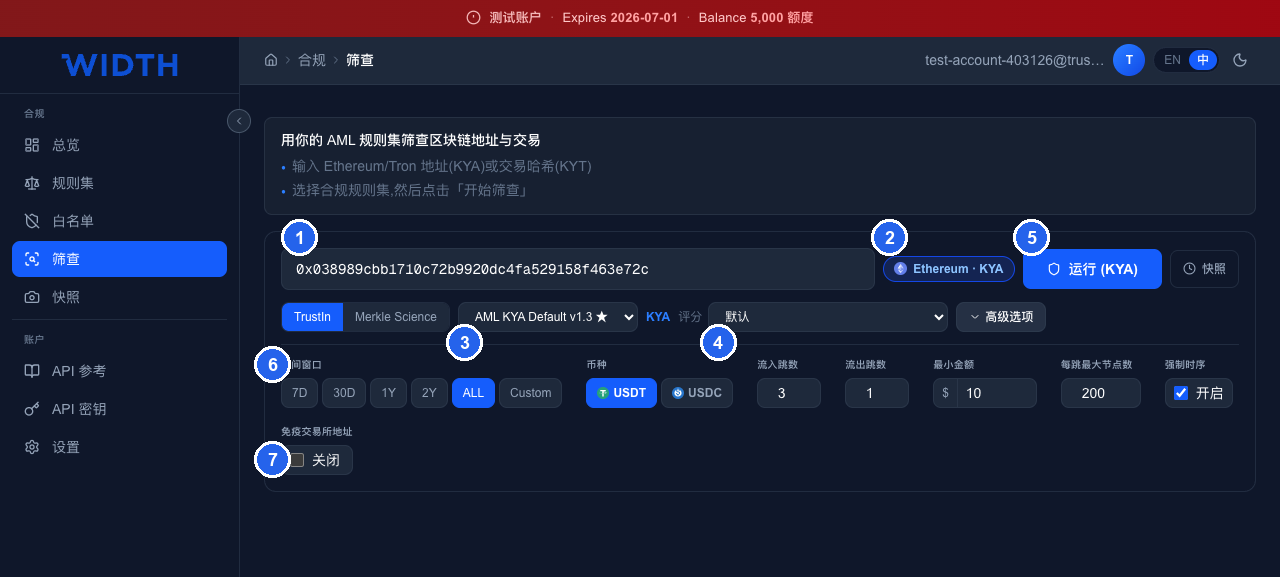
Screening page: input · auto-detected chain & type · path-matching ruleset picker (★ = default) · scoring ruleset picker · run button · advanced options · CEX-immune toggle (on by default, see §07).
筛查页面:输入框 · 自动识别的链与筛查类型 · 路径匹配规则集选择器(★ 为默认)· 打分映射规则集选择器 · 运行按钮 · 高级选项 · 免疫交易所地址开关(默认开启,见第 07 节)。
- Address / transaction-hash input
- 地址 / 交易哈希输入框
- Auto-detected chain and screening type (Ethereum · KYA)
- 自动识别的链与筛查类型(Ethereum · KYA)
- Path-matching ruleset picker — ★ marks the default
- 路径匹配规则集选择器,★ 为默认
- Scoring ruleset picker
- 打分映射规则集选择器
- Run button — the detected type is shown in parentheses
- 运行按钮,括号内是识别出的类型
- Advanced options: time window, currency, hops, min amount, max nodes per hop
- 高级选项:时间窗口、币种、跳数、最小金额、每跳最大节点数
- CEX-immune toggle (on by default — read §07 first)
- 免疫交易所地址开关(默认开启,见第 07 节)
The two dropdowns are the subject of this manual: the left one picks “what counts as a violation”, the right one picks “how severe it is”.
两个下拉框正是本手册的主题:左边选「什么算违规」,右边选「有多严重」。
Advanced options
高级选项说明
| Option选项 | Default默认 | Note说明 |
|---|---|---|
| Time window时间窗口 | ALL | Limits the analyzed tx range. Narrowing the window is significantly slower and returns fewer paths — keep ALL unless you really need otherwise.限定分析的交易时间范围。缩小窗口会显著变慢且返回更少路径,除非确有需要否则保持 ALL。 |
| Currency币种 | USDT | USDT and USDC are supported today.目前支持 USDT 与 USDC。 |
| Inflow / outflow hops流入 / 流出跳数 | 3 / 1 | Max hops per direction, 0–5. More hops = slower.各方向最多追几跳,范围 0–5。跳数越大越慢。 |
| Min amount最小金额 | $10 | Transfers below this are excluded — filters dust.低于此金额的转账不纳入分析,用于过滤粉尘交易。 |
| Max nodes per hop每跳最大节点数 | 200 | How many counterparties each hop expands to, controlling graph size.每一跳最多展开多少个对手方,控制图规模。 |
| Strict time ordering强制时序 | ON | Each hop's time must be ≥ the previous hop — funds only flow forward in time. Fewer paths, but more trustworthy.要求路径上每一跳的时间不早于前一跳,即资金只能沿时间正向流动。开启后路径更少但更可信。 |
| CEX-immune免疫交易所地址 | ON | Exchange addresses are treated as clean and returned directly. Read §07 first.把交易所地址视为干净并直接返回。请先阅读第 07 节。 |
Step 2 · Read the result summary
第二步 · 读懂结果摘要
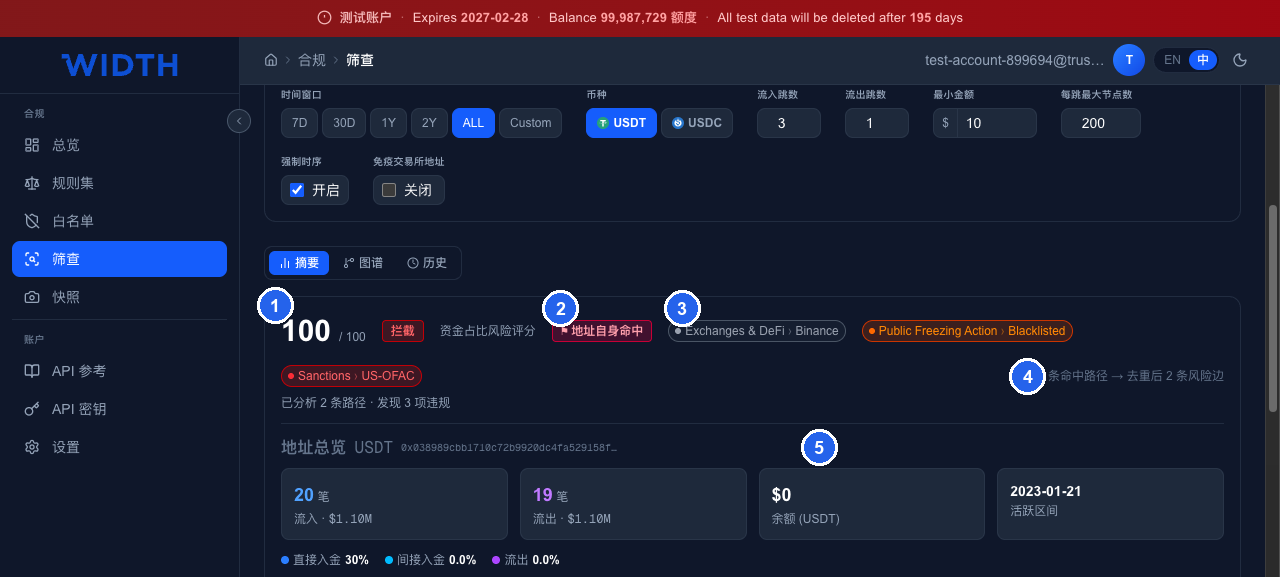
Result summary: final score & disposition · self-hit marker · the address's own labels · hit paths / deduped risk edges · address overview with inflow / outflow / balance / active range.
筛查结果摘要:最终分数与判定 · 地址自身命中标记 · 地址自身携带的标签 · 命中路径数/去重后的风险边数 · 地址总览(总流入/总流出/余额/活跃区间)。
- Final score and disposition — produced by the scoring ruleset
- 最终分数与判定,由打分映射规则集产出
- Address self-hit marker — score goes straight to the top
- 地址自身命中标记,分数直接拉满
- The address's own labels
- 地址自身携带的标签
- Hit paths → deduped risk edges
- 命中路径数 → 去重后的风险边数
- Address overview: total inflow / outflow / balance / active range — below it, the risk-funds share of direct inflow, indirect inflow and outflow
- 地址总览:总流入 / 总流出 / 余额 / 活跃区间,下方一行是直接入金、间接入金、流出各自的风险资金占比
The three tabs on top: Summary / Graph / History. The Graph tab visualizes the fund flow; History shows past screenings of this address.
顶部三个页签:摘要 / 图谱 / 历史。图谱页可视化资金流,历史页显示该地址过往筛查记录。
If the ruleset has highlighted rules (★), a “Highlighted rules M/N hit” pill sits next to the disposition and a “Highlighted rules hit” block lists those hits before everything else. On the Graph tab every hit path is drawn into the screened address with each hop labelled by amount and last transfer time; click an address for its details or a hop for its transactions, and filter by risk level or “Highlighted only”.
若规则集含有重点规则(★),判定旁会出现「重点规则命中 M/N」计数,并有一个「重点规则命中」区块把这些命中排在最前。图谱页把所有命中路径汇入被筛查地址,每一跳标注金额与最后转账时间;点击地址查看详情、点击一跳查看其交易,并可按风险等级或「仅重点」筛选。
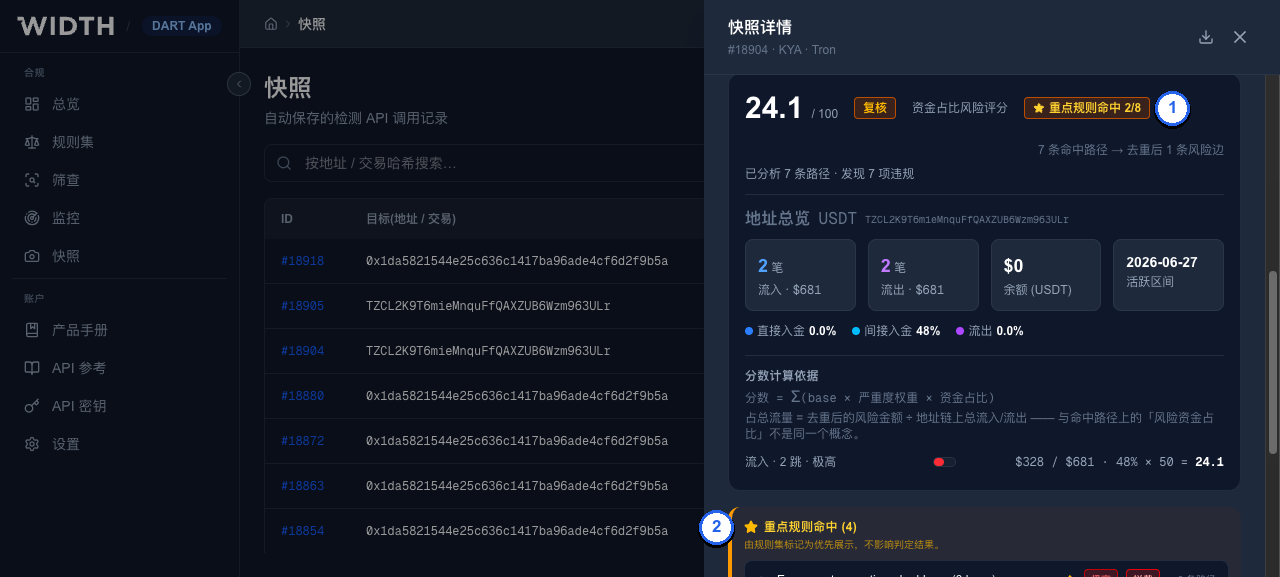
Result summary of a ruleset with highlighted rules: the ★ pill next to the disposition counts hits of highlighted rules; the “Highlighted rules hit” block lists them ahead of the triggered-rule list.
含重点规则的结果摘要:判定旁的 ★ 计数统计重点规则命中;「重点规则命中」区块把它们列在触发规则列表之前。
- Highlighted rules M/N hit — N highlighted rules in the ruleset were evaluated, M of them hit
- 重点规则命中 M/N —— 规则集中 N 条重点规则参与评估,其中 M 条命中
- Highlighted rules hit — those hits, grouped by rule and expandable to the evidence chain; the same hits also appear ★-marked in the full list below
- 重点规则命中 —— 这些命中按规则分组,可展开证据链;它们同时也出现在下方完整列表中并带 ★
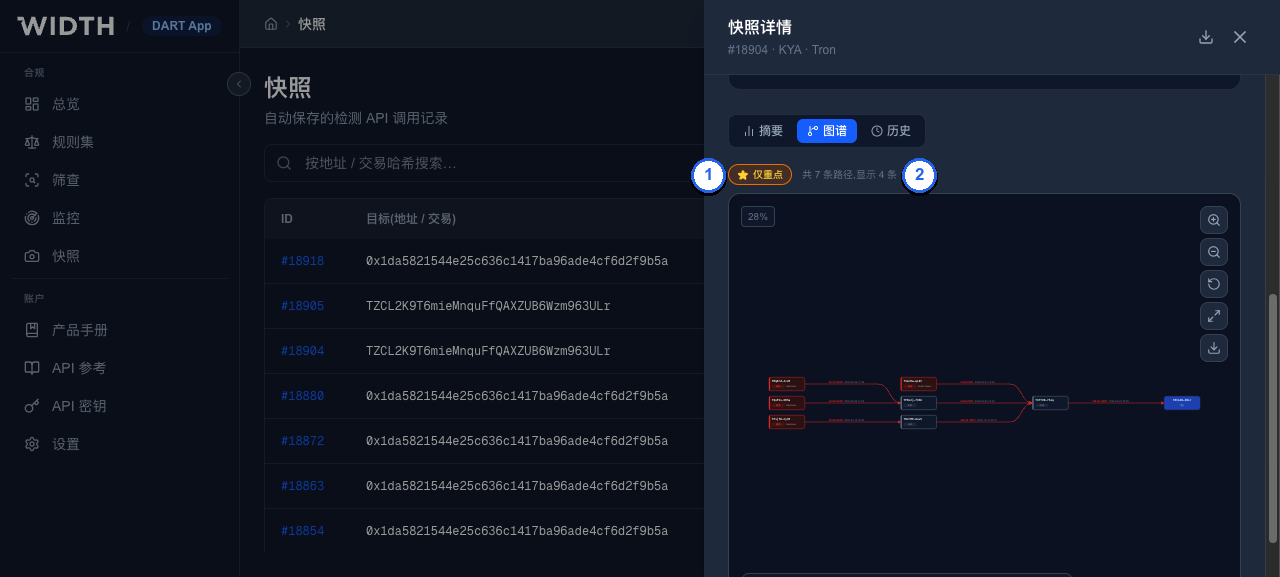
Graph tab with “Highlighted only” on: only paths hit by highlighted rules are drawn, and the counter shows how many of the total that is.
图谱页开启「仅重点」:只绘制重点规则命中的路径,计数显示占总路径的多少。
- Highlighted only — toggle the filter; combine it with the risk-level chips
- 仅重点 —— 切换筛选,可与风险等级筛选叠加
- Path counter — paths shown out of the total
- 路径计数 —— 显示中的路径数 / 总路径数
Step 3 · Verify where the score came from
第三步 · 核对分数来源
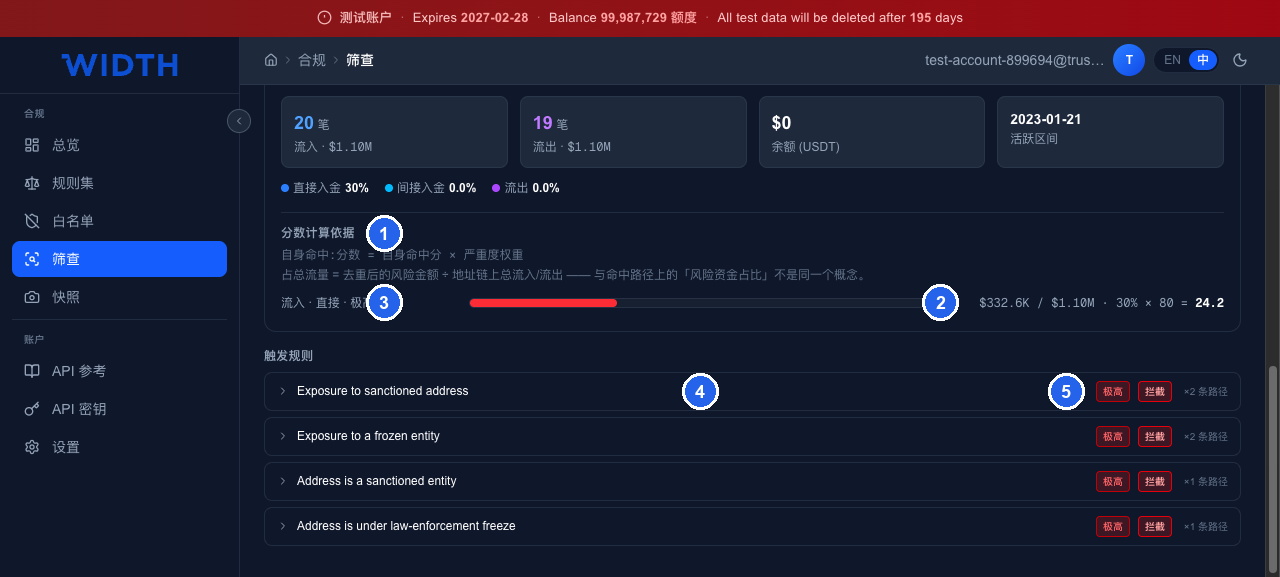
“Score calculation basis” and “triggered rules” break the final score open for you.
「分数计算依据」和「触发规则」把最终分数拆开给你看。
- The calculation basis used this time (a self-hit in this example)
- 本次采用的计算口径(此例为自身命中)
- Cell derivation: $332.6K / $1.10M · 30% × 80 = 24.2
- 单格推导:$332.6K / $1.10M · 30% × 80 = 24.2
- The matrix cell it maps to — “inflow · direct · extreme”
- 该格对应矩阵中的「流入 · 直接 · 极高」
- Triggered rule list — expandable hit details
- 触发规则列表,展开可看命中详情
- Each rule's severity, action and hit-path count
- 每条规则的严重度、处置动作与命中路径条数
This example shows both calculation paths at once: the additive path gives the inflow-direct cell 24.2 points, but because a self-hit rule also fired, the final score takes “self-hit score × severity weight = 100 × 1” — straight to Block.
这个例子同时展示了两条计算路径:累加口径算出流入直接格 24.2 分,但因为同时命中了自身命中规则,最终分数走「自身命中分 × 严重度权重 = 100 × 1」,直接判定为拦截。
In the hit details, a path's exposure is its smallest edge — the bottleneck — and its risk_rate is that exposure over the path's last edge. These are the very numbers the rule's amount and risk_rate conditions were tested against, so what you read in the evidence is what the rule saw; ★ marks hits of highlighted rules.
命中详情里,一条路径的敞口(exposure)取它最小的一条边——瓶颈——risk_rate 则是该敞口除以路径的最后一条边。这正是规则的 amount 和 risk_rate 条件比较时用的数,因此证据里看到的就是规则看到的;★ 标出重点规则的命中。
Step 4 · Keep records
第四步 · 留档
Every screening automatically generates a snapshot recording the request parameters and the complete result at that moment. “Compliance › Snapshots” lets you revisit any historical screening for audit purposes — snapshots cannot be tampered with.
每次筛查都会自动生成一份快照,记录当时的请求参数与完整结果。在「合规 › 快照」可以回查历史筛查,用于审计留痕。快照详情不可篡改。
06Using the APIAPI 使用方式
Everything the console can do, the API can do. The two rulesets are selected with two parameters.
控制台能做的,API 都能做。两套规则集通过两个参数分别指定。
Create an API key under “Account › API Keys”; “Account › API Reference” lets you test every endpoint right in the page. Base URL: https://test-api.width.live, with a backup domain https://test-api.trustin.bond — the same service with the same API keys, for when the primary cannot be reached. Only resend a request on the backup if it never got through (the name did not resolve or the connection was refused); a screening that timed out may already have run.
在「账户 › API 密钥」创建密钥,「账户 › API 参考」可以直接在页面上调试所有接口。基础地址 https://test-api.width.live,另有备用域名 https://test-api.trustin.bond:同一服务、同一 API 密钥,主域名无法访问时使用。只有请求根本没发出去(域名解析失败或连接被拒绝)时才改用备用域名重发;超时的筛查可能已经执行,重发会重复筛查。
Run a screening
发起筛查
// KYA:筛查地址 / KYA: screen an address
POST /api/v3/screen/kya?apikey=YOUR_KEY

{
  "chain_name": "Ethereum",
  "address": "0x...",
  "token": "usdt",
  "inflow_hops": 3,
  "outflow_hops": 1,
  "ruleset_id": 0,          // 路径匹配规则集,0 = 内置默认 / path-matching ruleset, 0 = built-in default
  "scoring_ruleset_id": 0,  // 打分映射规则集,0 = 内置默认 / scoring ruleset, 0 = built-in default
  "cex_immune": true,
  "mode": "async"           // sync 直接返回结果,async 返回 job_id / sync returns inline, async returns a job_id
}
KYT uses /api/v3/screen/kyt with tx_id, and you can set screen_direction to in / out / both, plus separate in_ruleset_id and out_ruleset_id.
KYT 用 /api/v3/screen/kyt,传 tx_id,并可用 screen_direction 指定 in / out / both,以及分别指定 in_ruleset_id 与 out_ruleset_id。
A KYT screen covers one transfer. When a transaction moves the token more than once (a batch payout, a DEX route), list its transfers with POST /api/v3/transaction-transfers (chain_name, tx_id, optional token; not charged) and pass the one you mean as event_index — the logIndex on EVM chains, the log position inside the transaction on Tron — or name it by from_address / to_address. Without either the first transfer is screened, and the same one on every repeat of the call. The response's transfer says which transfer was screened and its own amount; transferCount above 1 means there were others. In the console, a transaction hash with several transfers shows them under the input — pick one before running.
一次 KYT 筛查只针对一笔转账。一笔交易里同一代币转了多次时(批量代付、DEX 路由),先用 POST /api/v3/transaction-transfers(chain_name、tx_id,token 可选;不扣额度)列出其中的转账,再把要筛的那一笔的 event_index 传给筛查接口:EVM 链上是 logIndex,Tron 上是这笔交易内的日志序号。也可以用 from_address / to_address 指定。都不传时筛第一笔,之后重复调用也始终是同一笔。返回里的 transfer 说明实际筛的是哪一笔、这一笔自己的金额;transferCount 大于 1 表示还有别的转账。控制台里输入的交易哈希有多笔转账时,输入框下方会列出来,选好再点运行。
Fetch results asynchronously
异步取结果
GET /api/v3/screen/result/{job_id}?type=kya&apikey=YOUR_KEY

// status: PENDING | PROCESSING | COMPLETE
// COMPLETE 时 result 字段带完整结果 / when COMPLETE, the result field carries the full result
After submitting an async job the system starts computing immediately — polling only reads status, it never triggers computation. Most integrations should use async: sync mode can take a long time on deep hops or highly active addresses.
提交异步任务后系统会立即开始计算,轮询只是读取状态,不会触发计算。绝大多数集成建议使用 async:同步模式在深跳数、高活跃地址上可能耗时较久。
Every screening call gets its own job_id, even when two calls screen the same address with different settings, and a job_id only ever returns the result of the call that created it. The result is computed with the parameters that call was submitted with; nothing passed on the poll changes it.
每次筛查调用都会拿到自己独立的 job_id,即使两次调用用不同设置筛查同一个地址也是如此;一个 job_id 只会返回创建它的那次调用的结果。结果按那次提交的参数计算,轮询时传的参数不会改变它。
Read a screening back by snapshot ID
按快照 ID 取回筛查
GET /api/v3/snapshots/{snapshot_id}?apikey=YOUR_KEY

// 返回该次筛查的参数(parameters)和结果(result) / returns the screening's parameters and result
Every screening is recorded as a snapshot. A sync response carries its id as snapshotId; an async job reports it as snapshot_id once COMPLETE. Monitoring alerts and the console’s snapshot pages show snapshot IDs too. Only your own snapshots can be read; screenings made through the API come back exactly as they were answered.
每次筛查都会记录为一个快照。同步调用的返回里带 snapshotId;异步任务在 COMPLETE 时返回 snapshot_id。监控告警和控制台快照页上也有快照 ID。只能读取本账号的快照;通过 API 发起的筛查会原样返回当时的结果。
Manage rulesets and rules via the API
用 API 管理规则集与规则
Everything the ruleset editor does is available under /api/v3/rulesets/* with the same API key. Builtin rulesets are visible and cloneable but read-only; whatever you create or clone is yours to edit. The usual flow: clone the builtin, change the copy, screen with the copy’s id.
规则集编辑器能做的事,/api/v3/rulesets/* 用同一把 API 密钥都能做。内置规则集可见、可克隆但只读;你创建或克隆出来的都可以随意改。常见流程:克隆内置 → 改副本 → 筛查时传副本的 id。
// 1. 克隆内置 KYA 规则集 / clone the builtin KYA ruleset
POST /api/v3/rulesets/clone          {"source_ruleset_id": 22, "name": "Ours"}
// → data.id = 42, rules 随副本一起复制 / rules copied along

// 2. 加一条规则 / add a rule
POST /api/v3/rulesets/rule/create    {
  "ruleset_id": 42,
  "rule_code": "MY_MIXER_EXPOSURE_H2",
  "name": "Exposure to a mixer (2 hops)",
  "risk_level": "high",              // low | medium | high | critical
  "action": "review",                // alert | review | edd | block | allow
  "direction": "inbound",            // inbound | outbound | both
  "min_hops": 2, "max_hops": 2,      // max_hops -1 = 只看地址自身标签 / the address's own labels only
  "conditions": [
    {"parameter": "primary_category", "operator": "==", "value": "Obfuscation"},
    {"parameter": "risk_rate", "operator": ">=", "value": 10}
  ]
}

// 3. 标为重点、改动、删除 / highlight, update, delete
POST /api/v3/rulesets/rule/highlight {"ruleset_id": 42, "rule_ids": [3077], "is_highlighted": true}
POST /api/v3/rulesets/rule/update    {"rule_id": 3077, "action": "block"}
POST /api/v3/rulesets/rule/delete    {"rule_id": 3077}

// 4. 读取 / read
POST /api/v3/rulesets/list           {"ruleset_type": "kya"}
POST /api/v3/rulesets/get            {"ruleset_id": 42}
POST /api/v3/rulesets/rule/list      {"ruleset_id": 42}

// 5. 用它筛查 / screen with it
POST /api/v3/screen/kya              {"chain_name": "Tron", "address": "T...", "ruleset_id": 42}
Condition parameters: primary_category, secondary_category, tertiary_category (the entity), quaternary_category (the address type), risk_level, risk_score describe the counterparty’s labels; hops, inflow_hops, outflow_hops, amount (USDT/USDC, the path’s smallest transfer), inflow_total_amount, outflow_total_amount, risk_rate (the path’s smallest transfer over its last, in %), direction, chain_name describe the path. Operators: == != IN NOT_IN CONTAINS > < >= <=. Writes are validated up front — a 400 names the field, a 403 means the ruleset is builtin, a 409 that the rule_code already exists in that ruleset. Every endpoint is documented with a live “Try it” panel under “Account › API Reference”; the rule endpoints there carry a “Rule conditions” panel with each parameter’s legal values, the label categories, worked examples and the pitfalls.
条件参数里,primary_category、secondary_category、tertiary_category(实体)、quaternary_category(地址类型)、risk_level、risk_score 描述对手方的标签;hops、inflow_hops、outflow_hops、amount(USDT/USDC,取路径上最小一跳)、inflow_total_amount、outflow_total_amount、risk_rate(路径最小一跳除以最后一跳,百分比)、direction、chain_name 描述路径。操作符:== != IN NOT_IN CONTAINS > < >= <=。写入会先校验:400 会指出是哪个字段,403 表示规则集是内置的,409 表示该规则集里已有同名 rule_code。所有接口在「账户 › API 参考」里都有带「试一试」面板的完整说明;其中规则相关的接口附有「规则条件」面板,列出每个参数的合法取值、标签分类、示例和注意事项。
Hand the API to an agent
把 API 交给 Agent
The reference is also published in forms an AI agent can consume directly: /llms-full.txt (the whole reference as one Markdown file), /llms.txt (an index), /openapi.json (OpenAPI 3.1) and /agent/SKILL.md (a ready-made skill), all on this site. For agents that speak MCP, the same API is exposed as tools at https://test-api.width.live/mcp (backup https://test-api.trustin.bond/mcp) — connect with Authorization: Bearer <your API key> and the agent gets screening, results and the full ruleset/rule management as typed tools. “Account › API Reference” has “For agents” in its top bar, with all the links and a copyable prompt (folded into a menu on narrower screens).
API 参考同时以 Agent 能直接读的形式发布:/llms-full.txt(整份参考的单个 Markdown)、/llms.txt(索引)、/openapi.json(OpenAPI 3.1)和 /agent/SKILL.md(可直接使用的技能文件),都在本站。支持 MCP 的 Agent 可以直接连 https://test-api.width.live/mcp(备用 https://test-api.trustin.bond/mcp),用 Authorization: Bearer <你的 API 密钥> 鉴权,即可获得筛查、取结果和完整规则集 / 规则管理的类型化工具。「账户 › API 参考」的顶栏里有「给 Agent 用」,汇总了这些链接和一段可复制的提示词(屏幕较窄时收进一个下拉菜单)。
07Notes & gotchas使用注意事项
⚠️ IMPORTANT · Exchange-address immunity (behavior varies by version)⚠️ 重要 · 交易所地址免疫(行为随版本变化)
“CEX-immune” is on by default. While enabled, if the screened address carries an exchange (CEX) label, the system returns a clean result (0 / Pass) directly — no rule matching runs at all.
「免疫交易所地址」默认开启。开启时,若被筛地址带有交易所(CEX)标签,系统会直接返回干净结果(0 分 / 通过),不再执行任何规则匹配。
As of the production version of 2026-08-17, any address with a CEX label is immune even if it also carries a sanctions label — such addresses are judged “Pass” under default settings. For strong-compliance scenarios such as sanctions screening, explicitly disable the toggle.
截至 2026-08-17 的生产版本,只要地址带 CEX 标签就会被免疫,即使它同时带有制裁标签——这类地址在默认设置下会被判为「通过」。对制裁筛查等强合规场景,请显式关闭该开关。
A later version will tighten immunity to “pure CEX”: when the address also carries any of Sanctions, Terrorism Financing, Public Freezing Action, Illicit Markets, Other Financial Crimes, Cybercrime, Obfuscation, Gambling, High-Risk Entities, it will no longer be immune and will run the full screening. After the upgrade you won't need to disable the toggle manually — go by the actual version in your environment.
后续版本会把免疫范围收紧为「纯 CEX」:当地址同时带有 Sanctions、Terrorism Financing、Public Freezing Action、Illicit Markets、Other Financial Crimes、Cybercrime、Obfuscation、Gambling、High-Risk Entities 之中任一类别时,不再免疫,而是正常走完整筛查。升级后可以不必再手动关闭开关——请以你所用环境的实际版本为准。
- Denominator — “funds share” in results is risk amount ÷ the address's total on-chain flow; the per-path “risk-funds share (
risk_rate)” is a different concept — the path's smallest edge (its exposure) over its last edge — used for layered-exposure thresholds. Don't mix them up. - 分母口径 —— 结果里的「资金占比」是风险金额占地址链上总流量的比例;而单条路径上的「风险资金占比(
risk_rate)」是另一个概念——路径最小边(即敞口)除以最后一条边——用于分层暴露规则的门槛判断。两者不要混用。 - Hops vs latency — the graph grows exponentially with each hop. For daily screening, inflow 3 hops / outflow 1 hop is recommended.
- 跳数与耗时 —— 跳数每增加一跳,图规模成倍增长。日常筛查建议流入 3 跳、流出 1 跳。
- Time window — narrowing the window is slower (edge-by-edge filtering, not index-based) and returns fewer paths. Keep ALL unless you have a specific need.
- 时间窗口 —— 缩小时间窗口反而更慢(逐边过滤而非索引过滤),且返回路径更少。没有明确需求就保持 ALL。
- Custom rulesets — built-in rulesets are read-only. To adjust rules or the matrix, clone the ruleset first, then edit the clone. Inside a ruleset, Copy on a rule row derives a new rule from an existing one.
- 自定义规则集 —— 内置规则集只读。要调整规则或矩阵,先克隆规则集,再在副本上修改。规则集内部,每条规则行上的复制用于从既有规则派生新规则。
- Quota — every screening consumes quota; the top bar shows remaining quota and expiry.
- 额度 —— 每次筛查消耗额度,顶部横条显示剩余额度与有效期。
Compiled from production configuration: path-matching rulesets v1.3 (built-in IDs 22 / 23 / 24), scoring ruleset v1.0 (built-in ID 51). Screenshots from the AML console v2.
本手册内容依据生产环境实际配置整理:路径匹配规则集 v1.3(内置 ID 22 / 23 / 24),打分映射规则集 v1.0(内置 ID 51)。截图取自 AML 控制台 v2。
08Adverse Media Screening负面新闻筛查
A separate module from the two rulesets above: it screens a natural person against negative news rather than tracing on-chain funds.
这是独立于上述两套规则集之外的另一个模块:它筛查的是自然人的负面新闻报道,而不是链上资金路径。
Give it a person's name — and ideally a few more identifying details — and it searches the web and X for adverse media (sanctions, financial crime, corruption and similar), verifies every source it cites, scores the findings, and returns a 0–100 score with a verdict (accept / review / edd / block) for a compliance analyst to review and disposition. It is built for KYC/EDD on individuals: onboarding customers, UBOs, directors, large counterparties.
提供一个人的姓名——最好再补充几项身份信息——系统会在网页与 X 上搜索负面新闻(制裁、金融犯罪、贪腐等),核实所引用的每一个来源,为命中结果打分,并给出 0–100 分与一个处置结论(accept 通过 / review 复核 / edd 强化尽调 / block 拒绝),交由合规分析师复核并处置。该模块面向个人的 KYC/EDD 场景:入职客户、受益所有人(UBO)、董事、大额交易对手。
⚠️ SCOPE — not a sanctions-list check⚠️ 范围说明——不是制裁名单筛查
Adverse media screening does not replace official sanctions-list screening (OFAC / UN / EU). “Sanctions” here is a news category among the findings — a report that a person is alleged to be connected to sanctions evasion — not a match against an official designated-persons list. It also does not check PEP status. Every result is AI-generated research: read the evidence before deciding.
负面新闻筛查不能替代官方制裁名单筛查(OFAC / 联合国 / 欧盟)。此处的「制裁」只是命中结果中的一个新闻类别——某条报道指称某人与规避制裁有关——而不是与官方指定人员名单的比对结果。它也不检查 PEP(政治公众人物)身份。每一份结果都是AI 检索生成的调查结果:请先核实证据,再做判断。
Inputs, and why strong identifiers matter
输入字段,以及为什么「强标识符」很重要
Only full_name is required. Everything else is optional, but at least one of the fields marked below as a strong identifier sharply reduces false positives from a namesake — someone else who happens to share the name. Submit a name alone and the result carries low_information: true and every finding's match level is capped at medium, however strong the evidence otherwise looks.
full_name(姓名)是唯一必填字段。其余字段均为选填,但下表标记为强标识符的字段中只要填写一项,就能显著降低「同名不同人」造成的误判。仅凭姓名提交,结果会带上 low_information: true 标记,且无论证据看起来多充分,所有命中的匹配度都会被限制在 medium(中)以内。
| Field字段 | Required是否必填 | Notes说明 |
|---|---|---|
| full_name | Yes是 | Any script (Chinese, pinyin, English, …)任意文字系统(中文、拼音、英文……) |
| aliases[] | No否 | Former names, other-script spellings曾用名、其他文字系统的姓名写法 |
| birth_date | Strong identifier强标识符 | YYYY or YYYY-MM-DDYYYY 或 YYYY-MM-DD |
| nationality / residence_country | Strong identifier强标识符 | ISO 3166-1 alpha-2 country codeISO 3166-1 两位字母国家代码 |
| position / organization | Strong identifier强标识符 | Free text自由文本 |
| x_handle | Strong identifier强标识符 | X (Twitter) handleX(推特)账号 |
| gender | No否 | Not a strong identifier — too coarse (2–3 values) to corroborate identity on its own不算强标识符——取值太粗(仅 2–3 种),不足以单独佐证身份 |
| customer_ref | No否 | Your own record id, echoed back and filterable in the API您自己的记录编号,结果中原样返回,并可在 API 中作为筛选条件 |
For each finding the model reports matched_attributes / conflicting_attributes — which subject field corroborated or contradicted the event, with a verbatim quote. Code then decides the match level: high (name matches, ≥1 strong identifier corroborated, no conflicts), medium (name matches, no conflicts, no strong identifier corroborated), low (any strong-identifier conflict, or only a partial name match). Low-match findings never score — they are shown folded under “Unverified or low-match”.
对每条命中,模型都会给出 matched_attributes(匹配属性)/ conflicting_attributes(冲突属性)——说明是哪一个身份字段佐证或反驳了该事件,并附带原文引述。随后由代码判定匹配度:高(姓名匹配,至少一项强标识符得到佐证,无冲突)、中(姓名匹配,无冲突,但没有强标识符佐证)、低(存在强标识符冲突,或仅姓名部分匹配)。低匹配的命中不计入评分——会折叠显示在「未验证或低匹配」区域。
The 13 categories & event status
十三类负面新闻类别与事件进展状态
Every finding is classified into one of 13 fixed categories. The first 12 each map to a FATF designated category of offence and carry a fixed severity weight used in scoring; the last, negative_press, holds negative news coverage that alleges none of those offences and is never scored:
每条命中都会归入以下 13 个固定类别之一。前 12 类各对应一项 FATF 指定犯罪类别,并带有一个用于评分的固定严重度权重;最后一类 negative_press 收录不涉及上述违法犯罪的负面报道,只展示、不计分:
| Category类别 | code代码 | Severity严重度 |
|---|---|---|
| Sanctions / export control violations制裁/出口管制违规 | sanctions | 100 |
| Terrorism / terrorist financing恐怖主义/恐怖融资 | terrorism | 100 |
| Money laundering洗钱 | money_laundering | 85 |
| Financial fraud / scams / Ponzi schemes金融欺诈/诈骗/庞氏骗局 | fraud | 85 |
| Cybercrime / hacking / crypto theft网络犯罪/黑客/盗币 | cybercrime | 85 |
| Drug / human / arms trafficking毒品/人口/武器走私 | trafficking | 85 |
| Organized crime / illegal gambling有组织犯罪/非法赌博 | organized_crime | 85 |
| Corruption / bribery贪腐/贿赂 | corruption | 75 |
| Securities violations / market manipulation / insider trading证券违法/市场操纵/内幕交易 | securities | 75 |
| Tax crime税务犯罪 | tax_crime | 75 |
| Regulatory action / enforcement监管处罚/执法行动 | regulatory | 60 |
| Other serious crime其他严重刑事 | other_crime | 50 |
| Other negative news coverage其他负面报道 | negative_press | not scored不计分 |
Each finding also carries an event status — how far it has progressed: reported (reported / alleged), investigation (under investigation), charged, convicted, settled, cleared (acquitted / case dropped). Negative news that alleges none of the offences above — a workplace or labour scandal, a product or food safety incident, a tax or business dispute, a lawsuit, a public controversy — is reported as negative_press (status reported unless an authority acted): it appears among the findings for the analyst to review but never counts toward the score or verdict. Gossip and private life, political opinion, the subject as a victim, and neutral or positive news are out of scope and are not extracted as findings.
每条命中还带有一个事件进展状态:reported(报道/指控)、investigation(调查中)、charged(起诉)、convicted(定罪/处罚)、settled(和解)、cleared(无罪/撤诉)。不涉及上述违法犯罪的负面报道——如职场/劳工丑闻、产品或食品安全事件、税务或商业纠纷、诉讼、公众争议——归入 negative_press(除非有主管机关采取行动,状态均为 reported):会出现在命中列表中供分析师审阅,但不计入评分、不影响结论。八卦与私生活、政治观点、当事人作为受害者的报道,以及中性或正面新闻不在筛查范围内,不会作为命中被提取。
Scoring
评分机制
Each finding scores independently, then the finding scores combine into one screening score:
每条命中先独立计算自己的分数,再合并成一个筛查总分:
finding_score = severity(category) × status × recency × match × source

screening_score = max(counted finding scores) + 5 × (number of OTHER counted findings)
                   capped at 100
单条命中分数 = severity(类别严重度)× status(事件状态)× recency(时效)× match(匹配度)× source(来源)

筛查总分 = max(计入评分的命中分数) + 5 × (其余计入评分的命中数量)
          最高封顶 100
| Factor因子 | Values取值 |
|---|---|
| status事件状态 | convicted 1.0 · charged 0.85 · investigation 0.7 · reported 0.5 · settled 0.5 · cleared 0.1definitely convicted 定罪 1.0 · charged 起诉 0.85 · investigation 调查中 0.7 · reported 报道 0.5 · settled 和解 0.5 · cleared 无罪 0.1 |
| recency时效(距今年数) | ≤3y 1.0 · 3–7y 0.85 · 7–15y 0.7 · >15y 0.5 · unknown 0.85≤3 年 1.0 · 3–7 年 0.85 · 7–15 年 0.7 · >15 年 0.5 · 未知 0.85 |
| match匹配度 | high 1.0 · medium 0.7 · low 0 (never counted)高 1.0 · 中 0.7 · 低 0(从不计入评分) |
| source来源 | verified web source 1.0 · X-only 0.6已验证的网页来源 1.0 · 仅有 X 来源 0.6 |
A finding counts toward the score when: match level ≠ low, at least one of its sources is verified, and the reviewer has not dismissed it (false_positive / irrelevant), and its category is not negative_press. Unverified, low-match, dismissed and negative_press findings are shown for context but never move the score — not even through the +5 per additional finding.
满足以下条件的命中才会计入评分:匹配度不为「低」,至少有一个来源已验证,分析师尚未将其驳回(false_positive 误报 / irrelevant 不相关),且类别不是 negative_press。未验证、低匹配、已驳回以及 negative_press 类的命中仍会展示供参考,但不会影响分数(也不参与每多一条 +5 的加分)。
HARD RULES硬性规则
A sanctions or terrorism finding with match level high and at least one verified web source forces the screening score to ≥ 80 (block band). A screening whose only counted findings are X-sourced is capped at ≤ 49 — X corroboration alone is never enough to reach edd/block. Verdict bands reuse the platform's score-verdict thresholds: review 20 · edd 50 · block 80.
当命中类别为 sanctions(制裁)或 terrorism(恐怖主义),匹配度为高,且至少有一个来源已验证时,该筛查分数强制 ≥ 80(拒绝档位)。若一次筛查中计入评分的命中全部只有 X 来源,则总分封顶 ≤ 49——仅凭 X 来源的佐证不足以达到强化尽调/拒绝档位。处置档位沿用平台统一的分数判定阈值:review 复核 20 分 · edd 强化尽调 50 分 · block 拒绝 80 分。
Source verification
来源核实
Every source URL is fetched server-side (plain HTTP GET, no headless browser) and checked against the name and keywords the model claims appear verbatim in it. A source is verified only when the fetched page's text actually contains the subject's name and at least one matching keyword — a fabricated citation simply fails this check. X posts are verified through the public oEmbed endpoint, which returns the post text without login. A source the model named but that never appeared among the search tools' own citations is flagged separately (cited: false) — an extra fabrication signal. Sites that block non-browser fetches, return an error, or paywall the article come back unverified with a reason code, and are folded out of the main view rather than deleted.
每一个来源 URL 都会由服务端直接抓取(普通 HTTP GET,不使用无头浏览器),并核对模型声称原文中出现的姓名与关键词。只有当抓取到的页面文本中确实包含被筛查对象的姓名、且至少命中一个关键词时,该来源才被标记为 verified(已验证)——凭空捏造的引用会在这一步直接核实失败。X 帖子通过公开的 oEmbed 接口核实,无需登录即可取得帖子原文。若模型给出的来源从未出现在搜索工具自身的引用列表中,会被单独标记(cited: false)——这是另一个可能造假的信号。对拒绝非浏览器抓取、返回错误或设付费墙的网站,核实结果为 unverified(未验证)并带有具体原因代码,会折叠显示而非直接丢弃。
Disposition and closing
处置与结案
Every finding can be dispositioned confirmed (confirm match), false_positive (false positive) or irrelevant (not relevant), with an optional note; “Clear” removes a disposition. Dismissing a finding recomputes the score from the remaining counted findings — the original score/verdict is kept as original_score / original_verdict for audit. A screening whose verdict is edd or block can only be closed once every machine-counted finding has been dispositioned; closing otherwise is refused (HTTP 409) with a message naming what's still open. Results are labelled AI-generated (ai_generated: true) — per the customer terms, they must not be the sole basis for rejecting a customer.
每条命中都可以被处置为 confirmed(确认命中)、false_positive(误报)或 irrelevant(不相关),可附带备注;「清除」用于撤销已有的处置。驳回一条命中会用剩余计入评分的命中重新计算总分——原始分数/处置结论会保留为 original_score / original_verdict 以供审计追溯。处置结论为 edd(强化尽调)或 block(拒绝)的筛查,必须全部机器判定为计入评分的命中都完成处置后才能结案;否则结案请求会被拒绝(HTTP 409),并在提示信息中指明尚未处置的项。结果均标注为 AI 生成(ai_generated: true)——根据客户条款,不得将其作为拒绝客户的唯一依据。
Caching, limits & billing
结果复用、限额与计费
Submitting the same person (same normalised identity fields) again within 7 days returns the existing completed screening instead of running a new one (cached: true, not charged) — tick “Skip cache” on the screening form, or send force_refresh through the API, to bypass the cache and run a fresh one. Screenings are subject to a per-user daily limit and, once billing is enabled for the module, a per-screening token cost; the access endpoint reports your daily limit, today's usage, and whether billing is on. The v3 API additionally rate-limits screen to 60 requests/minute per key.
在 7 天内对同一个人(归一化后的身份字段相同)再次提交,会直接返回已有的已完成筛查结果,而不重新运行(cached: true,不计费)——在筛查表单上勾选「不使用缓存」,或通过 API 传入 force_refresh,即可跳过缓存重新筛查。筛查受每用户每日限额约束;一旦该模块开启计费,每次筛查还会扣除固定数量的代币。访问接口会返回您的每日限额、当日已用量,以及计费是否已开启。v3 API 的 screen 接口另有 60 次/分钟/密钥的限流。
AI-generated — human review requiredAI 生成结果——需要人工复核
Retrieval and extraction run on an LLM; matching, verification and scoring are deterministic code layered on top. Treat every result as a lead for a trained analyst, not a final answer: read the evidence, check the verified sources, and disposition each finding before acting on it.
检索与信息抽取由大模型完成;匹配、来源核实与评分则是叠加在其上的确定性代码逻辑。请将每一份结果都当作提供给专业分析师的线索,而非最终结论:核实证据、查看已验证来源,并对每条命中完成处置后再据此采取行动。
09Transaction tracing交易追踪
A separate tool from screening: start from a transaction (or an address, or up to 50 transactions) and follow where its money went, hop by hop — then see where that money may be now: still held, at an exchange, at a high-risk address, or across a bridge on another chain.
独立于筛查之外的工具:从一笔交易(或一个地址、或最多 50 笔交易)出发,逐跳追踪这笔钱去了哪里,并估算它现在可能在哪里——仍被持有、进了交易所、到了高风险地址,还是过桥到了另一条链。
Access — transaction tracing is enabled per account by your administrator. Without it the Transaction Trace entry does not appear in the sidebar. Tracing does not use screening quota.开通方式 —— 交易追踪由管理员按账号开通。未开通时侧边栏不会出现交易追踪入口。追踪不消耗筛查额度。
When to use it
什么时候用
- Screening asks “is this address risky?” and looks at its counterparties a few hops around it. Tracing asks “where did this money go?” and follows one transaction forward in time, hop by hop.
- 筛查回答「这个地址有没有风险」,看的是它周围几跳的对手方;追踪回答「这笔钱去了哪里」,沿时间顺序从一笔交易往后逐跳追。
- Typical uses: stolen or scam funds (where they are now, which addresses still hold them — leads for a freeze request); a withdrawal you have to explain; whether money that left you reached a sanctioned, frozen or high-risk address; money that went into a USDT0 bridge.
- 典型场景:被盗或诈骗资金(钱现在在哪、哪些地址还持有——可作为冻结线索);需要说明去向的一笔提币;从你这里流出的钱是否到了制裁、冻结或高风险地址;进入 USDT0 跨链桥的资金。
- It traces USDT and USDC on the chains the input recognises (Ethereum and Tron among them).
- 支持输入框能识别的链上的 USDT 和 USDC(包括以太坊和 Tron)。
Step 1 · Enter a transaction or an address
第一步 · 输入交易或地址
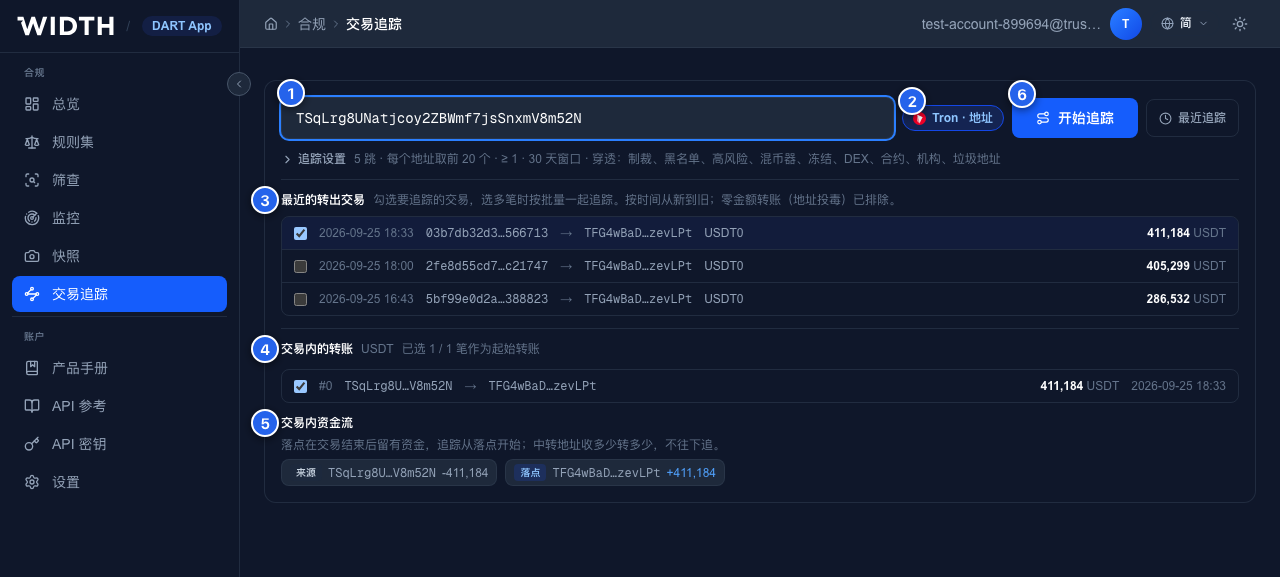
An address entered: its recent outgoing transactions, the selected transaction's transfers and the money flow inside it.
输入地址后:它最近的转出交易、所选交易内的转账,以及交易内资金流。
- Paste a transaction hash (Ethereum
0x…or Tron), an address, or several hashes — one per line, or separated by commas or spaces (a batch, up to 50). - 粘贴交易哈希(以太坊
0x…或 Tron)、地址,或多个交易哈希(每行一个,或用逗号、空格分隔,作为批量,最多 50 笔)。 - The page recognises the chain and what you pasted — transaction hash, address or batch.
- 页面自动识别链和输入类型——交易哈希、地址或批量。
- For an address: its 20 most recent outgoing transactions (zero-amount transfers, typical of address poisoning, are left out). The newest is ticked; tick several to trace them together as a batch.
- 输入地址时:列出它最近 20 笔转出交易(零金额转账、即常见的地址投毒已排除)。默认勾选最新一笔;勾选多笔即作为批量一起追踪。
- The transaction's USDT/USDC transfers. Untick the ones you do not want to start from.
- 该交易内的 USDT/USDC 转账,不想作为起点的可以取消勾选。
- The money flow inside the transaction: source, relay (passed on what it received) and landing (kept money after the transaction). The trace starts from the landing addresses; each is a branch.
- 交易内资金流:来源、中转(收多少转多少)和落点(交易结束后留有资金)。追踪从落点开始,每个落点是一个分支。
- Start trace. Most traces finish in seconds; an identical trace from the last 24 hours is reused. Recent traces lists your last 30, single and batch.
- 点开始追踪。大多数追踪几秒内完成;24 小时内参数相同的追踪会直接复用。最近追踪列出你最近 30 次追踪(单笔与批量)。
Step 2 · Adjust the trace settings (optional)
第二步 · 调整追踪设置(可选)
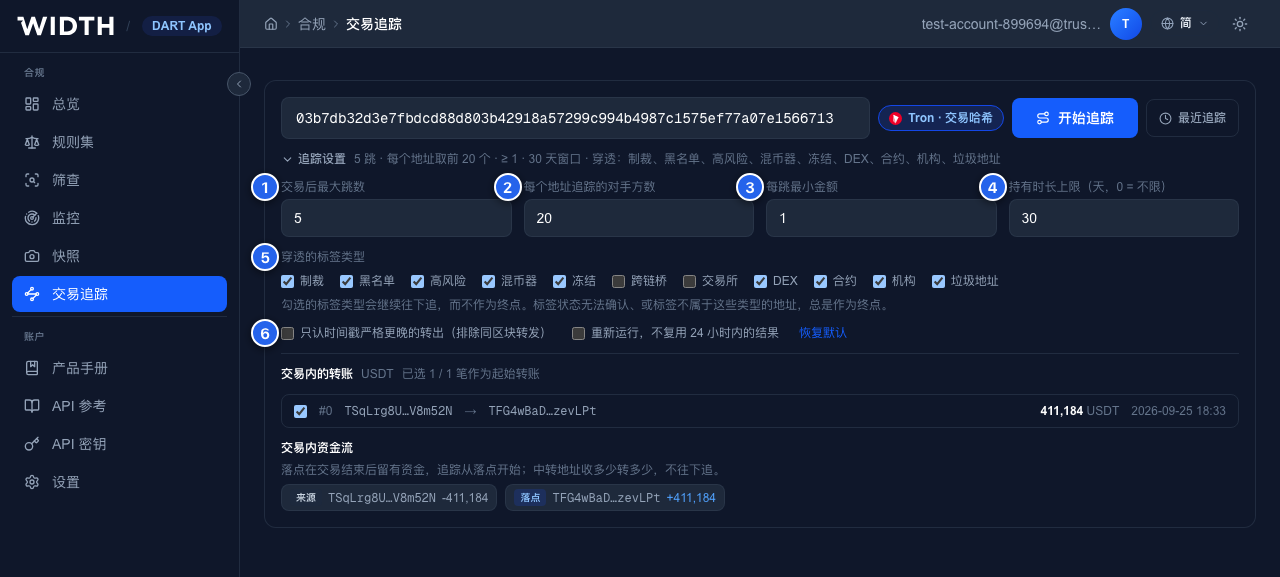
Trace settings, opened from the line under the input. Folded, the same line summarises them.
追踪设置,点输入框下方那一行展开;收起时这一行就是设置摘要。
| Setting设置项 | Default默认值 | What it does作用 | |
|---|---|---|---|
| 1 | Max hops after the transaction交易后最大跳数 | 5 (1–10)(1–10) | How far past the transaction a route may go. More hops find more, but a trace grows quickly with each hop.路径在交易之后最多走几跳。跳数越多找到的越多,但每多一跳规模增长很快。 |
| 2 | Counterparties followed per address每个地址追踪的对手方数 | 20 (1–200)(1–200) | At most this many of an address's outgoing counterparties are followed; the rest are not.每个地址最多往下追这么多个转出对手方,其余的不追。 |
| 3 | Minimum amount per hop每跳最小金额 | 1 | Smaller transfers are not followed. Raise it to drop dust and keep a busy trace readable.低于该金额的转账不追。调高可以去掉零碎转账,让繁忙的追踪更易读。 |
| 4 | Holding window持有时长上限 | 30 days (0 = no limit)30 天(0 = 不限) | How long money may sit at an address before an outgoing transfer still counts as its next hop.钱在一个地址停留多久以内,之后的转出仍算作它的下一跳。 |
| 5 | Tag types to pass through穿透的标签类型 | All except bridge and exchange除跨链桥、交易所外全部 | A ticked type is followed through; an unticked one ends the route. Addresses whose label cannot be confirmed, or that carry none of these types, always end it. See “How a trace runs” below.勾选的类型会继续往下追,不勾选的类型作为路径终点。标签状态无法确认、或不属于这些类型的地址总是作为终点。详见下文「追踪是怎么跑的」。 |
| 6 | Strictly later timestamps only只认时间戳严格更晚的转出 | Off关闭 | Only outflows with a later timestamp than the arrival count, dropping same-block forwarding (bots, routers).只认时间戳晚于资金到达的转出,排除同一区块内的转发(机器人、路由合约)。 |
| Run again instead of reusing重新运行,不复用 | Off关闭 | Ignores an identical trace from the last 24 hours and runs it afresh. Reset to defaults puts every setting back.忽略 24 小时内参数相同的追踪,重新跑一遍。恢复默认可把所有设置还原。 |
Step 3 · Read where the money may be now
第三步 · 看钱现在可能在哪里
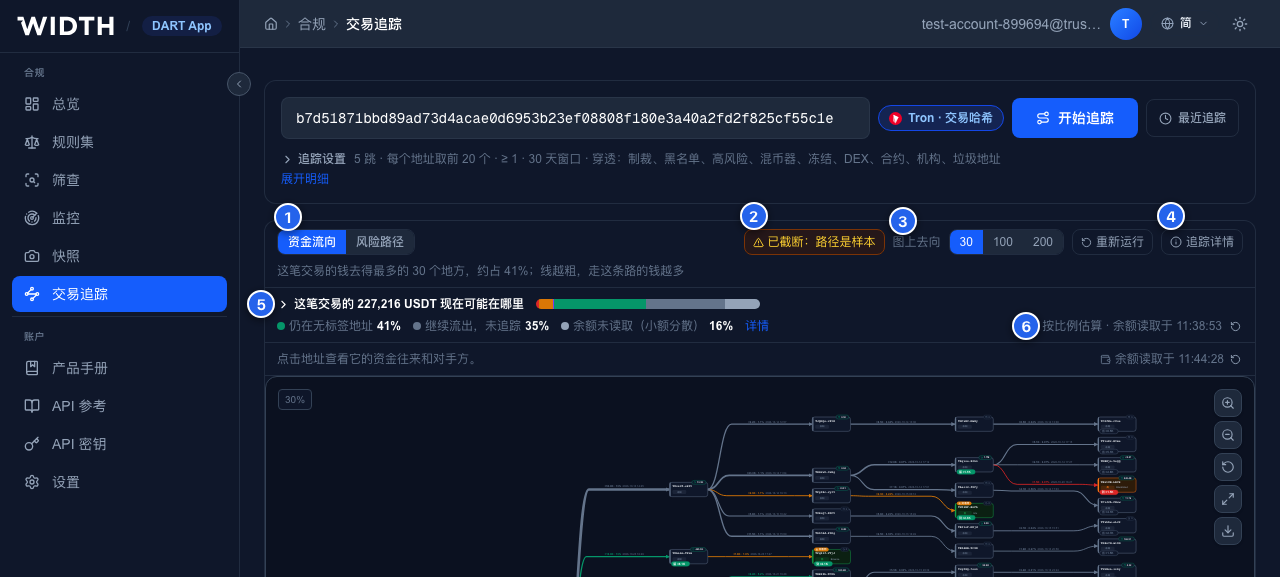
A single trace's result: the toolbar, the caption under it and the card that answers where the transaction's money may be now. The graph is below.
单笔追踪的结果:工具栏、下方的说明行,以及回答「这笔交易的钱现在可能在哪里」的卡片;图谱在下方。
- Where the money went (the default once the estimate is done) draws the routes the transaction's money took to where it ended; Riskiest routes switches to the trace's own routes, ranked by risk, with views by where they end — high risk, tagged, tagged low risk, untagged, label unknown.
- 资金流向(估算完成后默认显示)画出这笔交易的钱走到最终去向的路径;风险路径切换到追踪本身的路径,按风险排序,并按终点分为全部、高风险、有标签、有标签·低风险、无标签、标签未知几个视图。
- Warnings: truncated (the routes are a sample, not the full set) or label service degraded (far fewer routes than there should be — run it again later).
- 警告:已截断(路径是样本而不是全集),或标签服务降级(路径明显偏少,稍后重新运行)。
- How much the graph draws: 30, 100 or 200 destinations (or routes, in the risk view). The caption under the toolbar says how much of the money they cover.
- 图上画多少:30、100 或 200 个去向(风险路径视图下为路径数);工具栏下方一行说明它们覆盖了这笔钱的多少。
- Run again and Trace details — the trace's status, counts, how routes ended and its notes.
- 重新运行与追踪详情——追踪的状态、统计、路径终止原因及说明。
- The card: where the transaction's money may be now — reached high-risk addresses, crossed to another chain, at exchanges and other platforms, at other tagged addresses, still at untagged addresses (freeze leads), moved on beyond the trace, balance not read (small amounts), flowed back. Click a category to light its addresses on the graph; Details lists the largest of each.
- 卡片:这笔交易的钱现在可能在哪里——到达高风险地址、跨链转出、在交易所等平台、在其他有标签地址、仍在无标签地址(可冻结线索)、继续流出未追踪、余额未读取(小额分散)、回流(无法归属)。点某一类可在图上高亮这些地址;详情列出每一类中金额最大的地址。
- It is a proportional estimate, built from every route and the addresses' current balances; the reading time is shown, and the refresh icon reads the balances again. On a large trace it takes a minute or two and the numbers fill in as it goes.
- 这是按比例的估算,基于全部路径和各地址当前余额;旁边显示余额读取时间,点刷新图标可重新读取。大型追踪需要一两分钟,数字会边算边更新。
How the estimate works. An edge's amount is everything the two addresses moved in the holding window, not the traced money. Each address passes the traced money on in proportion to everything it moved after the money arrived — share = traced money in ÷ (what it sent on the trace + its balance now) — and keeps that share of its balance; a tagged end counts everything that reached it. Hovering a number shows its “at most ≤” bound, which never overstates. Money that reaches a cross-chain contract is counted as crossed, by where each bridge transfer went (Step 6).
估算方式。边上的金额是两个地址在持有窗口内的全部转账,并不都是被追踪的钱。每个地址按资金到达后它经手的全部资金按比例转出风险资金——占比 = 流入的风险资金 ÷(它在追踪中转出的金额 + 当前余额)——并按该比例留存余额;有标签的终点计入到达它的全部资金。悬停数字可看「最多 ≤」上限,上限不会高估。进入跨链合约的钱按每笔进桥转账的实际去向计为跨链转出(见第六步)。
Step 4 · Explore the graph
第四步 · 看图谱
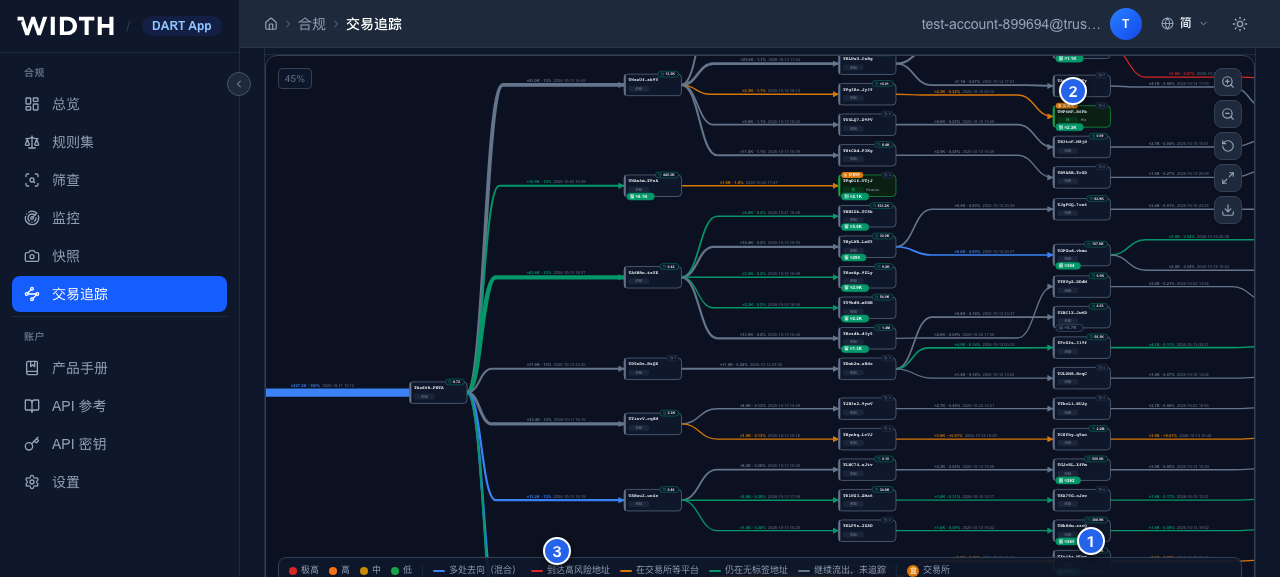
The money-flow graph: line width is how much of the money went that way, colour is where it ended.
资金流向图:线宽表示走这条路的钱有多少,颜色表示钱最终的去向。
- The chip under an address says how much of the money ended there: Held ≈ (still there), Reached ≈ (a tagged end; red when high risk), Out ≈ (left on transfers the trace did not follow), Crossed ≈ (bridged away). Its current balance sits on the card's top edge, green while money is still there.
- 地址下沿的小标签说明有多少钱停在这里:留 ≈(仍持有)、到 ≈(有标签的终点,高风险为红色)、出 ≈(经未追踪的转账流出)、跨 ≈(跨链转出)。卡片上沿是当前余额,仍有余额时为绿色。
- A badge says what an address is — Exchange (amber), Cross-chain · USDT0 or Bridge (magenta), DEX, mixer, institution, contract — while the card's colour still says its risk. Money into an exchange is mixed with its other users' (only the exchange can say where it went next).
- 徽标说明地址是什么——交易所(琥珀色)、跨链 · USDT0或跨链桥(品红色)、DEX、混币器、机构、合约;卡片底色仍表示风险。钱进入交易所后与其他用户的资金混在一起(之后的去向只能向交易所调证)。
- The legend: red to high risk, amber to exchanges and platforms, violet to other tagged addresses, green still at untagged addresses, grey moved on beyond the trace, blue where a stream splits several ways. An edge's label reads like
≈18.2K · 8%— the traced money on it · its share of the edge. - 图例:红色到达高风险,琥珀色交易所等平台,紫色其他有标签地址,绿色仍在无标签地址,灰色继续流出未追踪,蓝色为分流到多类去向。边上的标签形如
≈18.2K · 8%——该边上的风险资金 · 占该边比例。
Scroll or use the buttons on the right to zoom, drag to pan, drag an address to move it; the buttons also reset the view, go full screen and export a PNG. Click an edge to list its transfers. In Riskiest routes the edges are coloured by where a route ends: red to high risk, amber to a tagged entity, grey dashed to an untagged end.
滚轮或右侧按钮缩放,拖动画布平移,拖动地址可移动它;右侧按钮还可以复位视图、全屏和导出 PNG。点击一条边可查看该边上的转账。风险路径视图下,边的颜色表示路径终点:红色流向高风险,琥珀色流向有标签实体,灰色虚线为无标签终点。
Step 5 · Inspect an address
第五步 · 查看一个地址
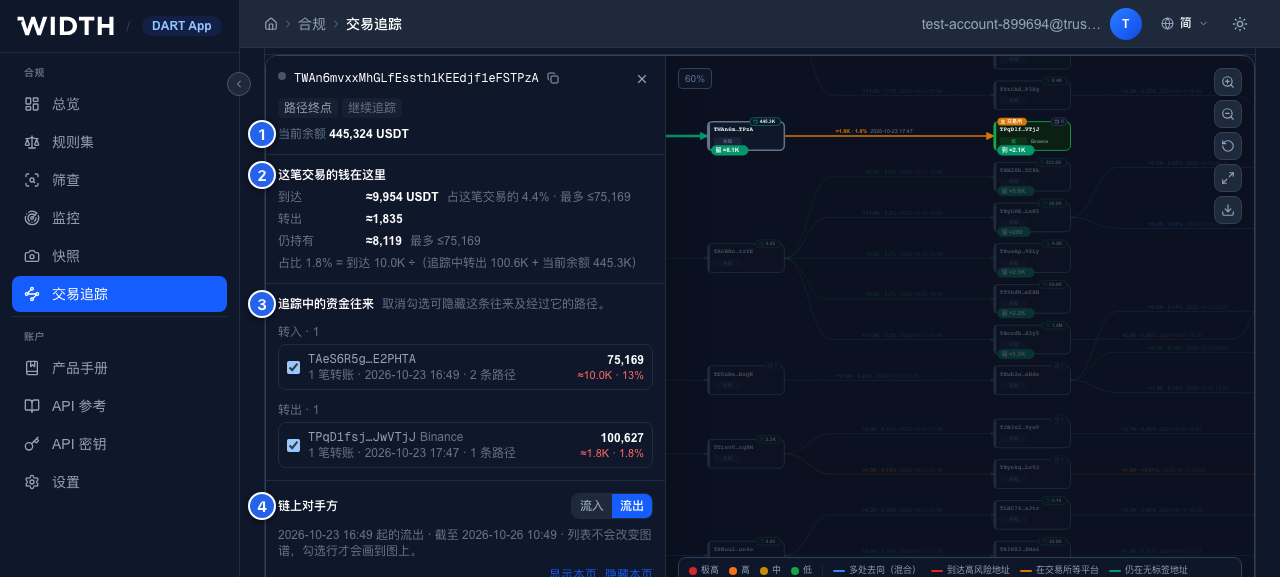
Click an address: its drawer slides in from the graph's left edge (the graph moves aside if it would be covered, and comes back when the drawer closes).
点击地址:抽屉从图谱左边缘滑出(会盖住该地址时图谱自动右移,关闭后回到原位)。
- The address: its labels and kind, its role on the trace (origin, landing, on the way, end of route and why), what it did inside the transaction, and its current balance.
- 地址本身:标签与类型、在追踪中的角色(起点、落点、途经、路径终点及终止原因)、在交易内的收支,以及当前余额。
- The transaction's money here: how much of it arrived, was passed on and is still held, with the share that splits it. In a batch, the panel also says when the money of two or more of the transactions meets here.
- 这笔交易的钱在这里:到达、转出、仍持有各多少,以及据以分摊的占比。批量时,两笔及以上交易的钱在此汇合也会在这里注明。
- Flows on this trace: the money into and out of it on the drawn routes — amount, transfers, first arrival, routes, traced money. Untick one to hide that flow and every route through it; a line above the graph counts what is hidden and brings it all back.
- 追踪中的资金往来:图上路径里流入和流出它的资金——金额、转账笔数、首次到达时间、路径数、风险资金。取消勾选即隐藏这条往来及经过它的所有路径;图谱上方会显示已隐藏的数量,可一键全部恢复。
- Counterparties on chain: its direct counterparties beyond the trace — Inflow (where its money came from) or Outflow (where it sent money, from the money's arrival on). The table loads by itself, a page at a time. The list does not change the graph: tick rows (or Show this page) to draw them, untick to take them off. Addresses already on the trace are marked and cannot be ticked.
- 链上对手方:追踪路径之外它的直接对手方——流入(资金来源)或流出(资金去向,从资金到达起)。表格自动加载、翻页即读取。列表不会改变图谱:勾选行(或显示本页)才会画到图上,取消勾选即移除;已在追踪路径上的地址会标出且不能勾选。
Step 6 · Follow money across a bridge
第六步 · 跨链继续追
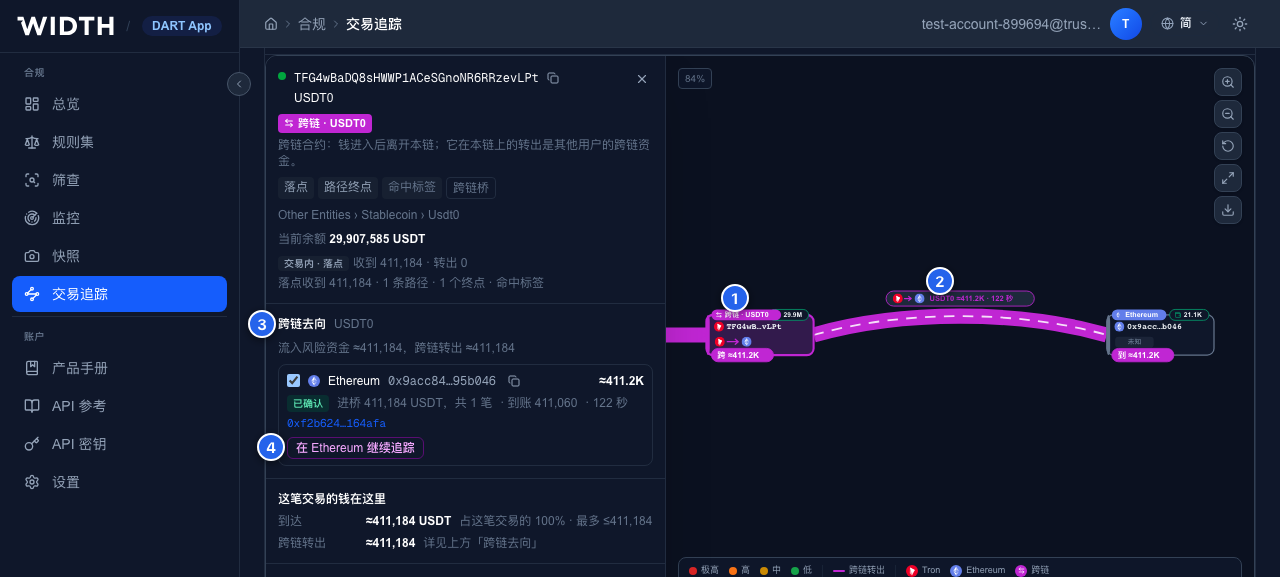
A transaction whose money went straight into the USDT0 bridge on Tron, and the bridge's drawer.
一笔钱直接进入 Tron 上 USDT0 跨链桥的交易,以及跨链合约的抽屉。
- The cross-chain contract (Cross-chain · USDT0). Money that reaches it leaves this chain; its transfers on this chain are other users' bridged money, so the route ends here by default.
- 跨链合约(跨链 · USDT0)。钱进入后离开本链;它在本链上的转出是其他用户的跨链资金,所以默认路径到此为止。
- The bridge: a magenta arch to the receiving address on the other chain, labelled with the two chains, the protocol, the amount and the bridging time. In a graph across chains every address carries its chain's logo.
- 跨链桥:一座品红色的桥拱向对侧链的收款地址,标签上是两条链的图标、协议、金额和跨链耗时。图上有多条链时,每个地址前都标出所在链的图标。
- Cross-chain: where the money went lists every destination — chain and address, status (confirmed, destination declared, pairing…), amount bridged and received, time, arrival transaction — each tickable onto the graph.
- 跨链去向列出每个去向——目的链与地址、状态(已确认、已声明目的地、配对中等)、进桥与到账金额、耗时、到账交易——每个都可以勾选画到图上。
- Continue the trace on Ethereum traces the arrival transactions there as a new batch with this trace's settings, starting from the traced money they carry rather than their whole amount. When it is done the money view draws the other chain's routes on after the receiving address — one graph from the origin, across the bridge, to where the money is now — and the panel links to that trace.
- 在 Ethereum 继续追踪会在目的链上把这些到账交易作为一个新的批量追踪(沿用本次设置),起点金额取其中的风险资金,而不是到账总额。完成后,资金流向图把目的链的路径接在收款地址后面——从起点、过桥、一直画到钱现在的位置;抽屉里可以打开那次追踪。
Example. On 2026-09-25 a wallet labelled Bitget_hacker sent 411,183.68 USDT on Tron straight into the USDT0 contract. Followed like any other address, the contract fans out into 2,339 routes of other people's money. The trace stops there instead, and the cross-chain view shows that 122 seconds later 411,060.33 USDT arrived on Ethereum at 0x9acc…b046 — an address labelled Bitget_hacker and Blacklisted. Continuing on Ethereum puts 100% of the money at that high-risk address.
示例。2026-09-25,一个被标记为 Bitget_hacker 的钱包在 Tron 上把 411,183.68 USDT 直接转进 USDT0 合约。如果把合约当普通地址往下追,会展开 2,339 条路径,全是别人的钱;默认设置下追踪停在这里,跨链视图则显示:122 秒后,411,060.33 USDT 到达以太坊上的 0x9acc…b046——一个同样被标记为 Bitget_hacker 和 Blacklisted 的地址。在以太坊继续追踪,100% 的钱都落在这个高风险地址上。
Step 7 · Several transactions at once
第七步 · 多笔交易一起追踪
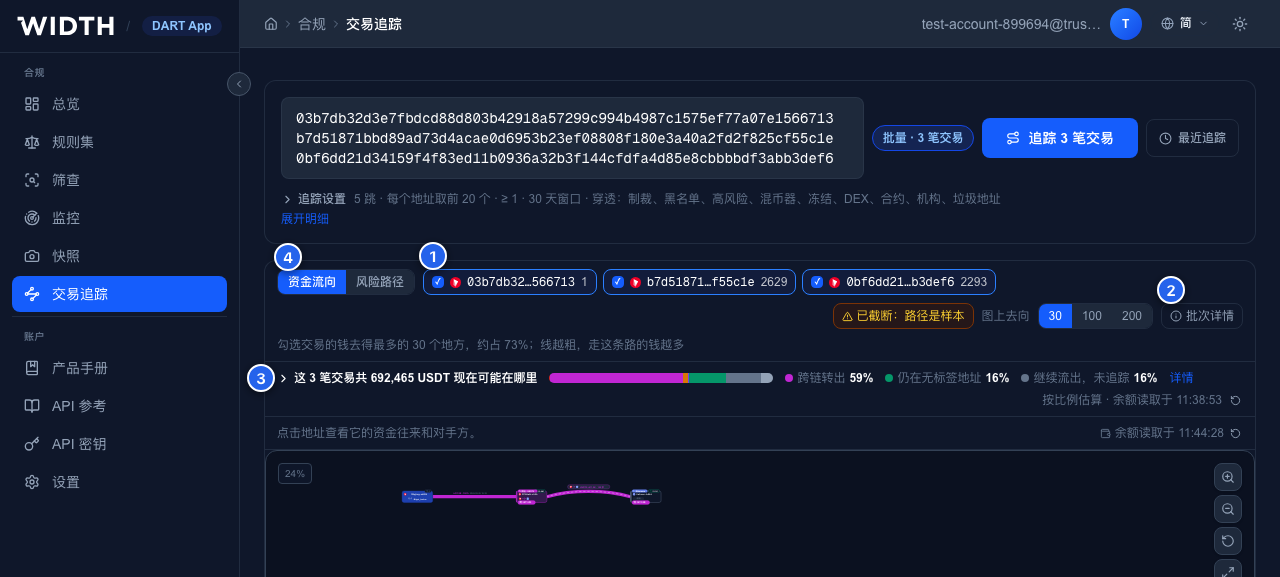
A batch of three transactions, traced with one set of settings and drawn as one graph.
三笔交易的批量:同一套设置追踪,画在一张图上。
- One chip per transaction, with its route count: tick the ones to draw, hover one to light its routes. The graph's places are shared equally among the ticked transactions; one with fewer routes passes the rest on.
- 每笔交易一个标签,附路径数:勾选几笔就画几笔,鼠标悬停可高亮这笔的路径。图上名额在勾选的交易间平分,某笔路径不够时把余下名额让给其他交易。
- Batch details: each transaction with its status, route counts and, when it could not be traced, why — View trace opens one on its own — plus the batch's counts and warnings.
- 批次详情:逐笔列出状态、路径数及无法追踪的原因(点查看追踪可单独打开某一笔),以及批次的统计和警告。
- The card adds up the transactions' estimates: where the batch's money may be now, split by transaction under Details. Two transactions can carry the same money (a later one spending what an earlier one left), so the sums can count it twice.
- 卡片把每笔交易的估算相加:这批交易的钱现在可能在哪里,展开详情可按交易查看。多笔交易可能是同一笔钱(后一笔花的是前一笔留下的钱),合计可能重复计算。
- Where the money went and Riskiest routes work as for a single trace. An address the money of two or more transactions reached carries a blue N txs meet badge.
- 资金流向与风险路径的用法与单笔相同;两笔及以上交易的钱都到达的地址带蓝色「汇合 N 笔」标记。
Each transaction is traced on its own, every transfer of it; one that moved both USDT and USDC is traced once per token. Addresses and malformed entries are left out with a note. Results show once the first transaction finishes and fill in as the rest do.
每笔交易单独追踪、追它的全部转账;同时有 USDT 和 USDC 转账的交易按币种各追一次。地址和格式不对的内容会被排除并提示。第一笔完成后即显示结果,其余完成后陆续补上。
Step 8 · Keep and share
第八步 · 留存与分享
- Every result has its own link (
?task=…or?batch=…) and stays under Recent traces. Once traced, the form folds the transaction's details away; Show details (or editing the input) brings them back. - 每个结果都有独立链接(
?task=…或?batch=…),并保留在最近追踪里。追踪后表单会收起交易明细,点展开明细(或修改输入)可再次展开。 - A link opens for the account that ran the trace. A colleague who runs the same trace (same transaction and settings, within 24 hours) gets the same result.
- 链接只对发起追踪的账号可见;同事用相同的交易和设置在 24 小时内再追一次,会得到同一份结果。
- Run again re-traces with current data; the export button on the graph saves it as a PNG for a report.
- 重新运行用最新数据重新追踪;图谱右侧的导出按钮可把图保存为 PNG,用于报告。
How a trace runs
追踪是怎么跑的
- Forward only, in order. Each next hop must happen after the money arrived (block and log order on Ethereum; block order on Tron).
- 只向后、按顺序。后一跳必须发生在资金到达之后(以太坊按区块与日志序号,Tron 按区块)。
- Stops at bridges and exchanges, passes through the rest. By default a route ends at a bridge or an exchange — money that reaches an exchange is mixed with its other users’, money that reaches a bridge leaves the chain (see Step 6) — and goes on through every other labelled address — sanctioned, blacklisted, high-risk, mixer, frozen, DEX, contract, institution, spam — ending where the money rests or at the depth limit (a labelled address there shows as “Depth limit (tagged)”). Addresses whose label cannot be confirmed or belongs to none of the tag types always end a route. Tick or untick tag types in Trace settings to change which are passed through.
- 停在跨链桥和交易所,其余标签穿过。默认路径遇到跨链桥或交易所即停止——进入交易所的钱与其他用户的资金混在一起,进入跨链桥的钱离开本链(见第六步);其余有标签的地址(制裁、黑名单、高风险、混币器、冻结、DEX、合约、机构、垃圾地址)默认穿透,路径在资金停留处或达到最大深度时结束(此处若有标签,显示为「达到最大深度(有标签)」)。标签状态无法确认、或标签不属于任何可穿透类型的地址,总是作为终点。可在追踪设置里勾选或取消要穿透的标签类型。
- Passing through an exchange hot wallet or a bridge follows everything that address sent on, most of it other people's money; a busy one fans out fast and the result is then truncated. Read such routes as leads, not as where this money went.
- 穿透交易所热钱包或跨链桥时,会追它转出的全部资金,其中大多是别人的钱;繁忙地址扩散很快,结果会被截断。这类路径只能当线索看,不能当作这笔钱的确定去向。
- Multi-transfer transactions (swaps, routers): the trace starts from the landing addresses — those that kept money after the transaction. Relays that passed on exactly what they received are not followed. Each landing address is a branch.
- 一笔交易里有多笔转账时(兑换、路由):追踪从落点开始——即交易结束后留有资金的地址;收多少转多少的中转地址不往下追。每个落点是一个分支。
- Zero-amount transfers (common in address poisoning) are never followed.
- 零金额转账(地址投毒常用)一律不追。
- Current balances are read from the chain once the graph is drawn (USDT and USDC on Ethereum and Tron, USDC on Base); readings may be up to a minute old. Small, scattered amounts are not read and show as Balance not read.
- 当前余额在图谱画出后从链上读取(以太坊和 Tron 上的 USDT、USDC,Base 上的 USDC),最多可能是一分钟前的;零散的小额不读取,计入「余额未读取」。
⚠️ How to read amounts and warnings⚠️ 金额与警告的读法
Only the landing amounts are exact. A later hop's amount is what that address sent to the next one within the window — every outflow after the money arrived counts as a possible destination — so it is not a split of the traced money, and bottleneck amounts must not be added up across routes. Use the estimate (≈) for how much of the transaction's money went where.
只有落点金额是精确值。后续每一跳的金额,是该地址在窗口内转给下一个地址的合计——资金到达后的每笔转出都算可能去向——因此它不是被追资金的分账,不同路径的瓶颈金额也不能相加。这笔交易的钱去了哪里、各多少,请看估算值(≈)。
If a result says it was truncated, the routes are a sample rather than the full set. If it says the label service was degraded, far fewer routes were found than should have been: do not draw conclusions from it — run it again later with Run again.
结果若提示被截断,表示路径是样本而不是全集。若提示标签服务降级,找到的路径会明显偏少:请勿据此下结论,稍后用重新运行再跑一次。
Common questions
常见问题
| You see现象 | Why, and what to do原因与处理 |
|---|---|
| Only one route, ending right after the transaction只有一条路径,交易后马上结束 | The money went into a bridge or an exchange, where routes stop by default. For a bridge, the cross-chain view shows where it went (Step 6). For an exchange, only the exchange can say more; you can tick Exchange in the settings, but expect a truncated result of mostly other people's money.钱进了跨链桥或交易所,默认在此停止。跨链桥:跨链视图会显示去向(见第六步)。交易所:之后的去向只能向交易所调证;也可以在设置里勾选「交易所」穿透,但结果多半会被截断,且大多是别人的钱。 |
| “Truncated: routes are a sample”「已截断:路径是样本」 | The trace hit one of its limits — too many new addresses in one hop, the address limit, only the first 50 transfers followed, or its time budget; Trace details says which. Raise the minimum amount, shorten the holding window or lower the hops to keep it inside them.追踪触到了某个上限——单跳新地址过多、地址数上限、只追了前 50 笔转账,或时间预算耗尽,追踪详情里会注明是哪一种。可调高每跳最小金额、缩短持有时长或减少跳数,让追踪落在上限之内。 |
| The transaction cannot be traced交易无法追踪 | It has no USDT/USDC transfer on a supported chain, or the index has not reached it yet (a few minutes after it confirmed). Check the hash and the chain, and try again later.交易里没有受支持链上的 USDT/USDC 转账,或索引尚未收录(刚确认的交易需要几分钟)。核对哈希和链,稍后再试。 |
| A trace finished instantly追踪瞬间完成 | An identical trace from the last 24 hours was reused. Tick Run again instead of reusing for fresh data.复用了 24 小时内参数相同的追踪。需要最新数据时勾选「重新运行,不复用」。 |
| The numbers keep changing数字一直在变 | The estimate is still reading routes and balances (a minute or two on a large trace). Wait for the reading time to appear next to the card.估算仍在读取路径和余额(大型追踪需要一两分钟),等卡片旁出现余额读取时间即可。 |
| A link opens as not found链接打开显示找不到 | Results open only for the account that ran them. Run the same trace from your own account.结果只对发起追踪的账号可见,用自己的账号再追一次即可。 |