

Every transfer has a history.See it before you accept the funds.
DART follows the funds up to five hops back through labeled counterparties, matches every path against your rules, and returns a 0–100 score with the exact rules behind it.
Built for exchanges, payment firms and licensed VASPs. Use it in the console, through the API, or from your AI agent.
- Sanctioned wallet3 hops upstream, OFAC SDN list
- Mixer2 hops upstream, obfuscation service
- 0x3f…9e121 hop upstream, unlabeled wallet
- 0x8a…c21eScreened address, inbound deposit
Click a tool to copy its setup prompt, then paste it there: it asks for your API key and connects itself. See an agent at work
02 · For agents
Ask in a sentence. Your agent screens, explains, and edits the rules.
DART is also an MCP server: 21 typed tools — screening, results, rulesets, rules — on the same engine, rulesets and API key as the console. Any MCP client connects with one URL; other agents read llms.txt or the skill file.
The tool results are real: the screening above, and a ruleset clone made on production for this page (deleted afterwards). The agent’s replies are written from them.
03 · Rulesets and scoring
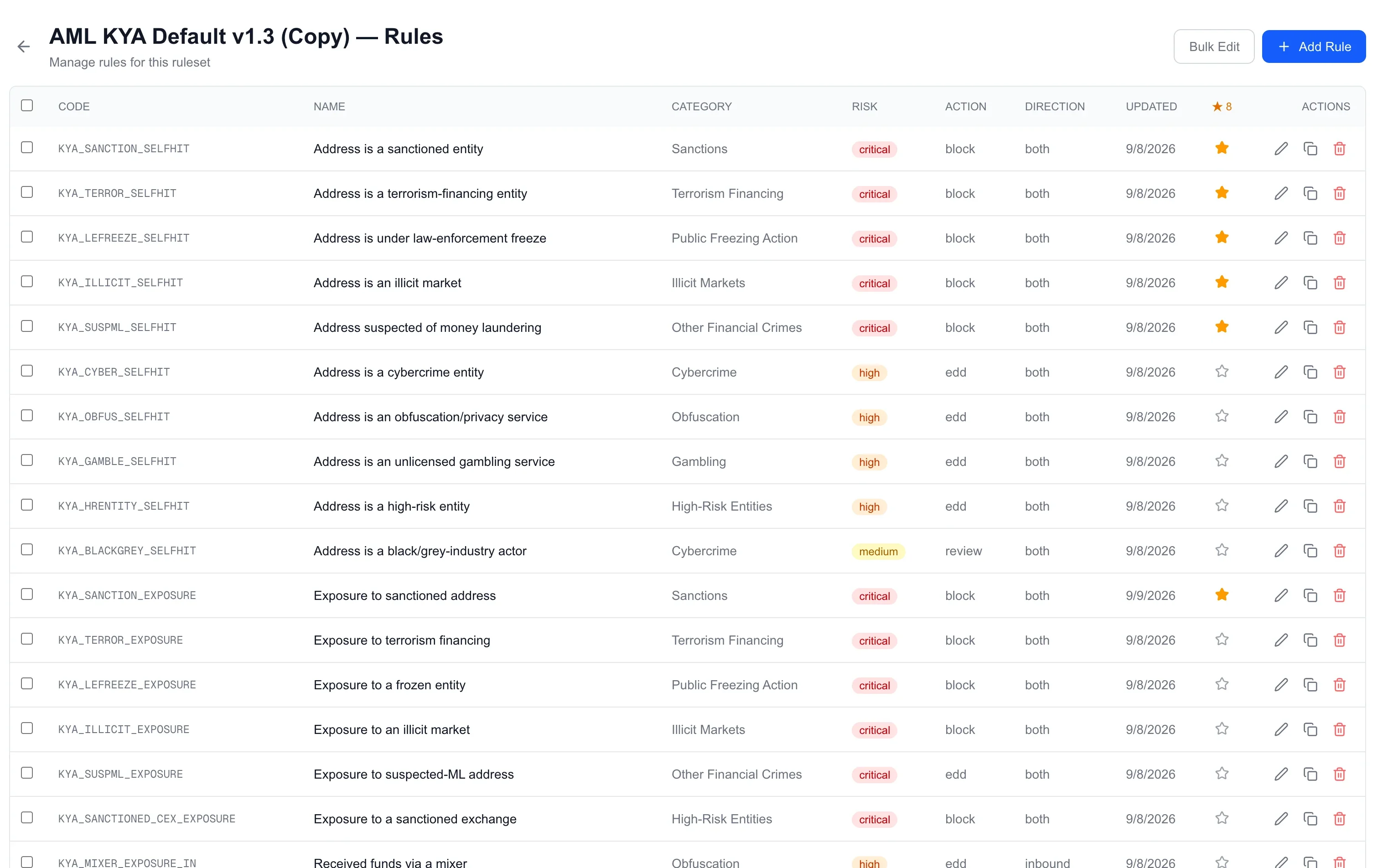
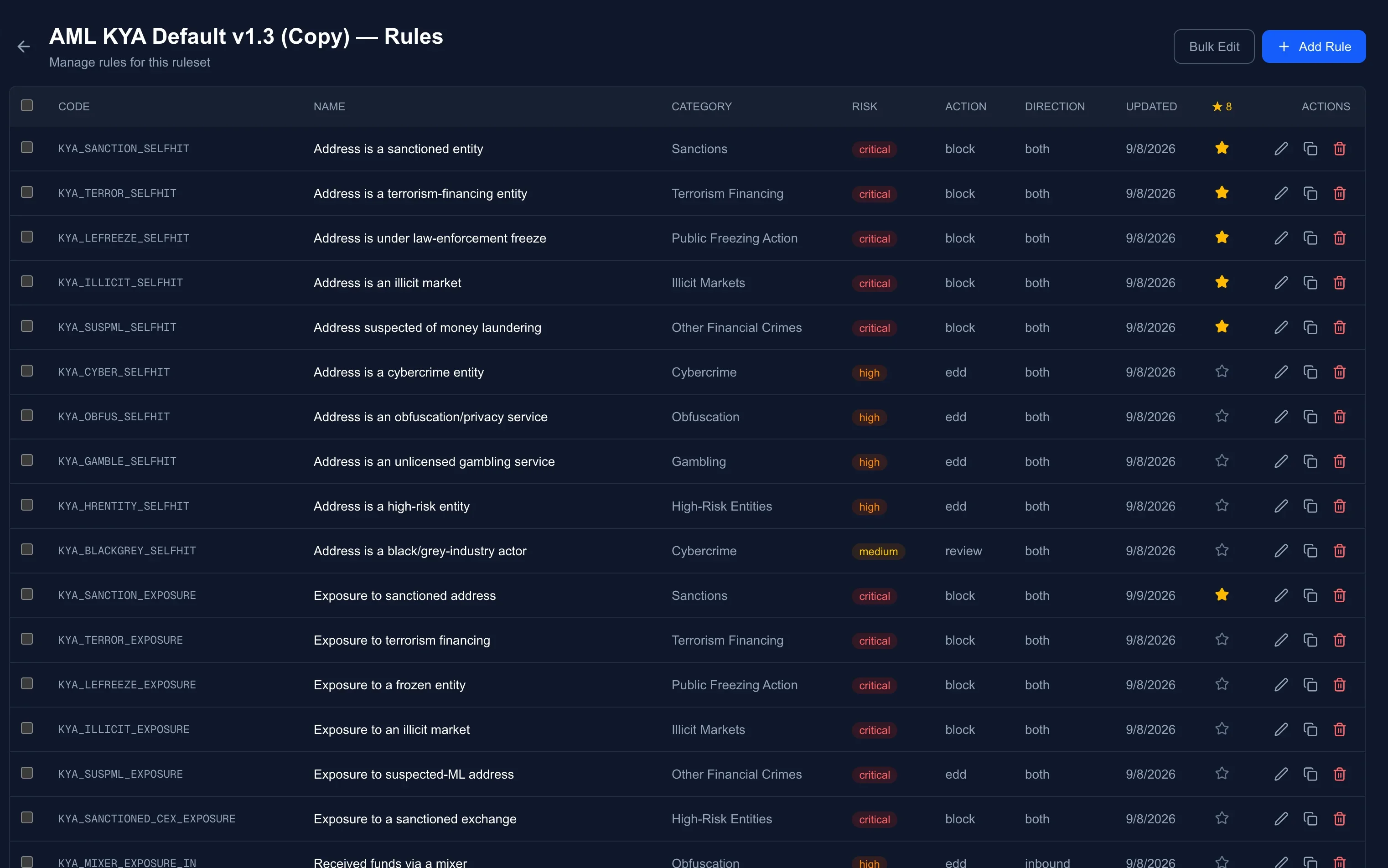
72 rules in plain sight. One matrix gives the score.
Every verdict traces back to a rule you can read and a matrix you can edit. Clone a built-in ruleset, change a threshold, copy a rule into a variant, mark the ones you care about with a ★ — the engine runs exactly what the editor shows.
One rule, as stored
{
  "rule_code": "KYA_SANCTION_EXPOSURE_H2",
  "name": "Exposure to sanctioned address (2 hops)",
  "category": "Sanctions",
  "risk_level": "critical",
  "action": "block",
  "min_hops": 2,
  "max_hops": 2,
  "conditions": [
    { "parameter": "primary_category",
      "operator": "==", "value": "Sanctions" },
    { "parameter": "amount",
      "operator": ">",  "value": 10, "unit": "USDT/USDC" },
    { "parameter": "risk_rate",
      "operator": ">=", "value": 5 }
  ],
  "reference": "MAS PSN02; FATF R.16"
}
Three conditions, all of which must hold. amount is the smallest edge on the path — the funds that could actually traverse it — and risk_rate divides that by what the screened address received. The hop band is exact: this rule speaks only for 2-hop paths; its siblings cover 1 and 3 to 5.
Then the score
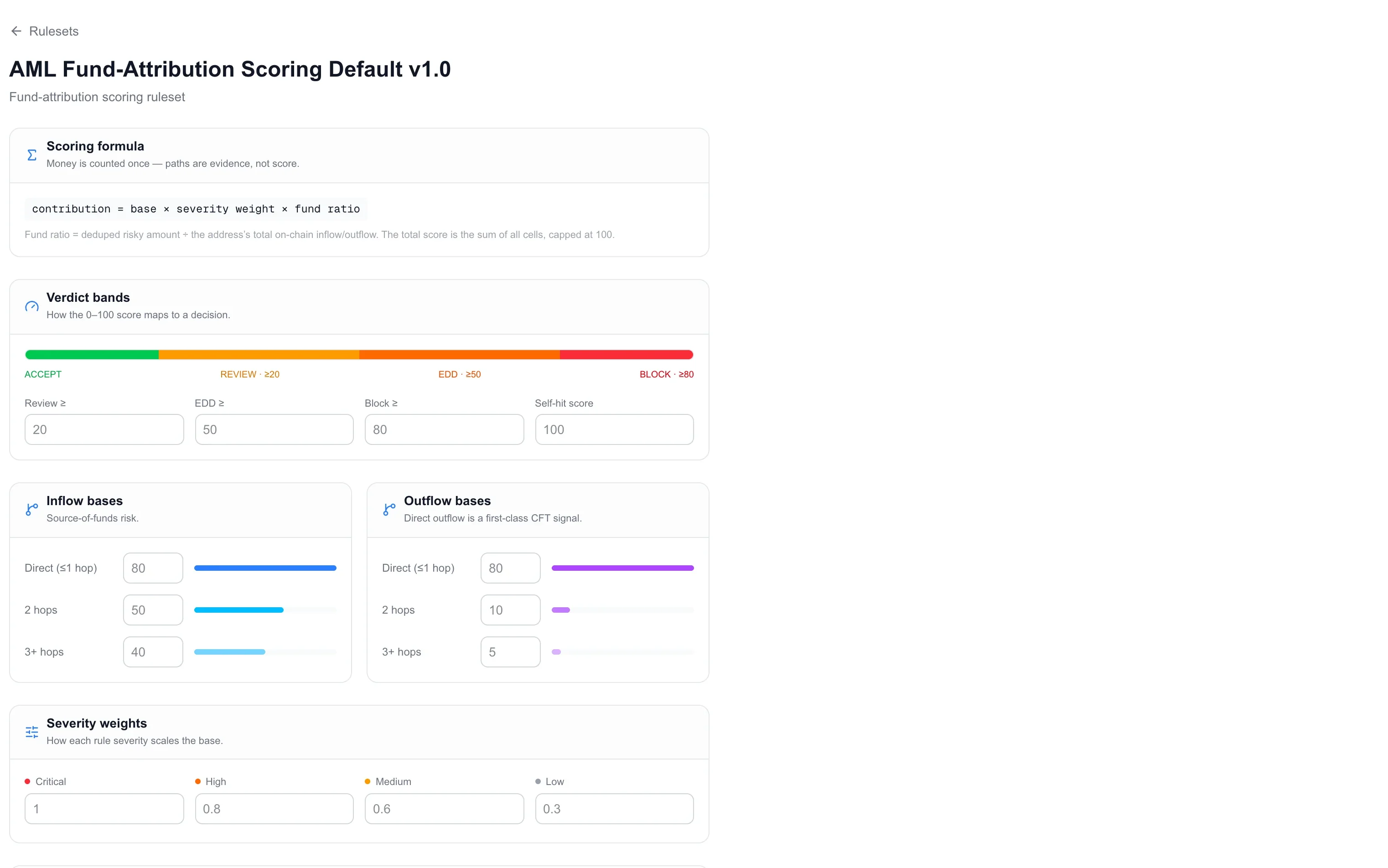
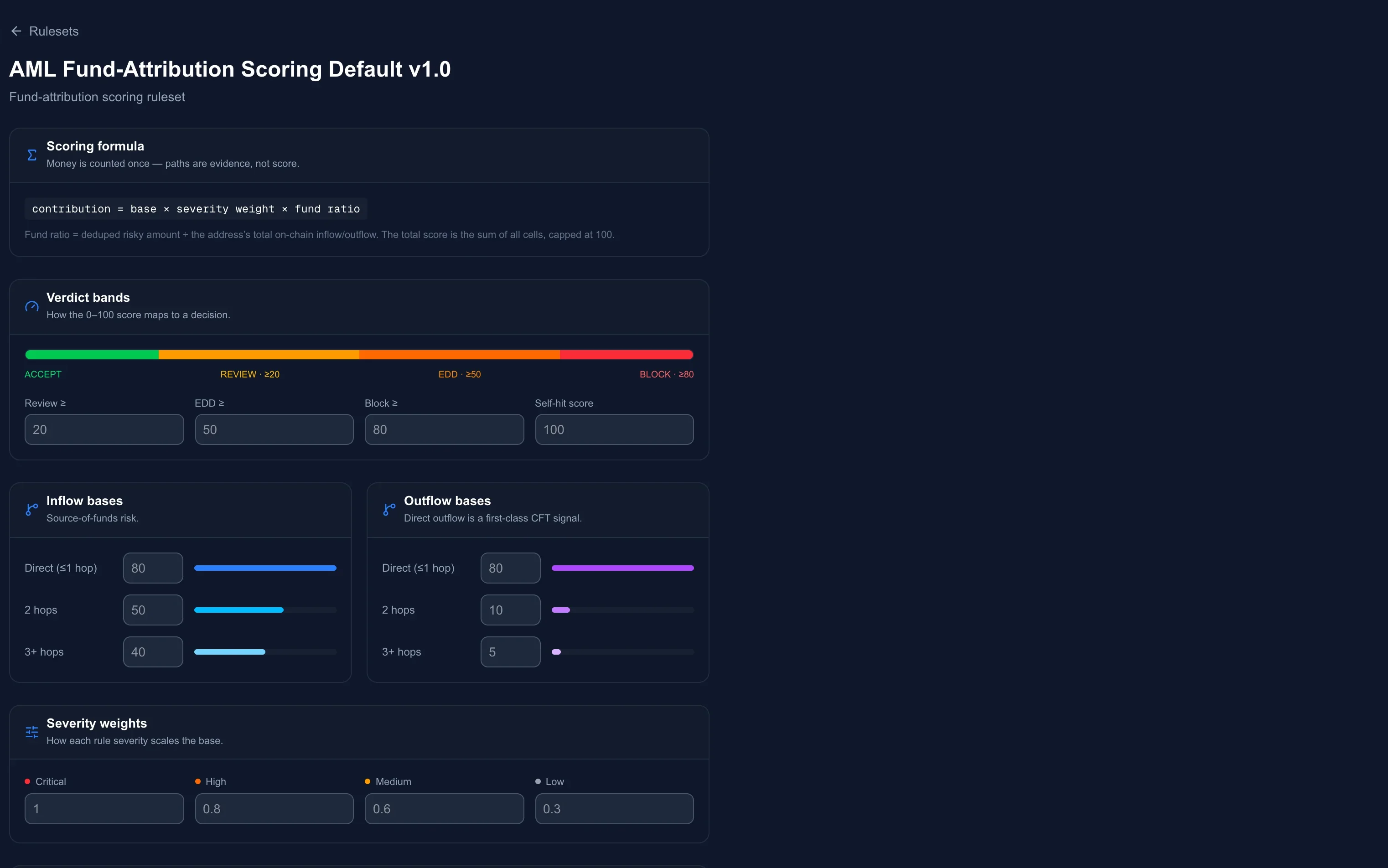
contribution = base × severity weight × fund ratio
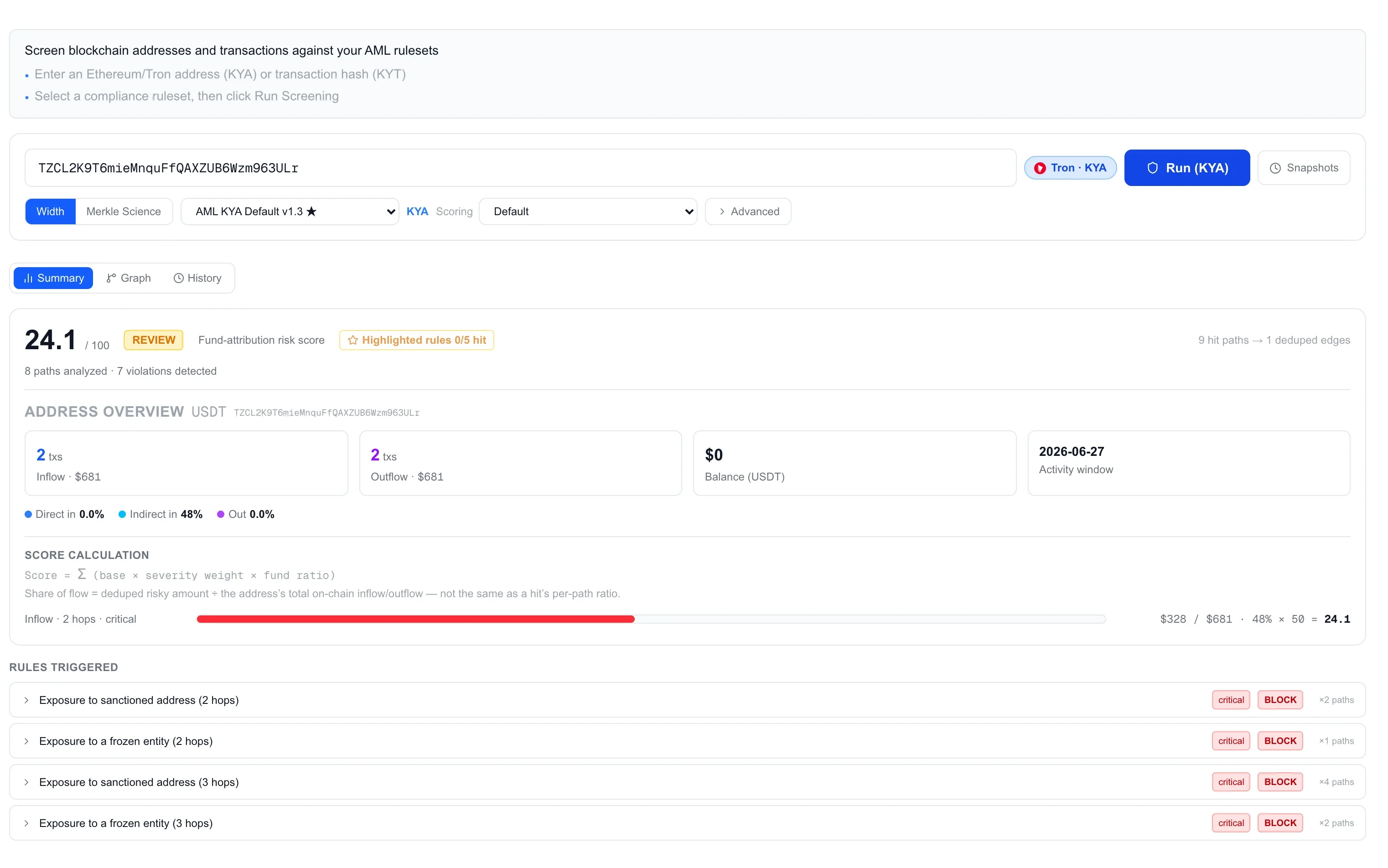
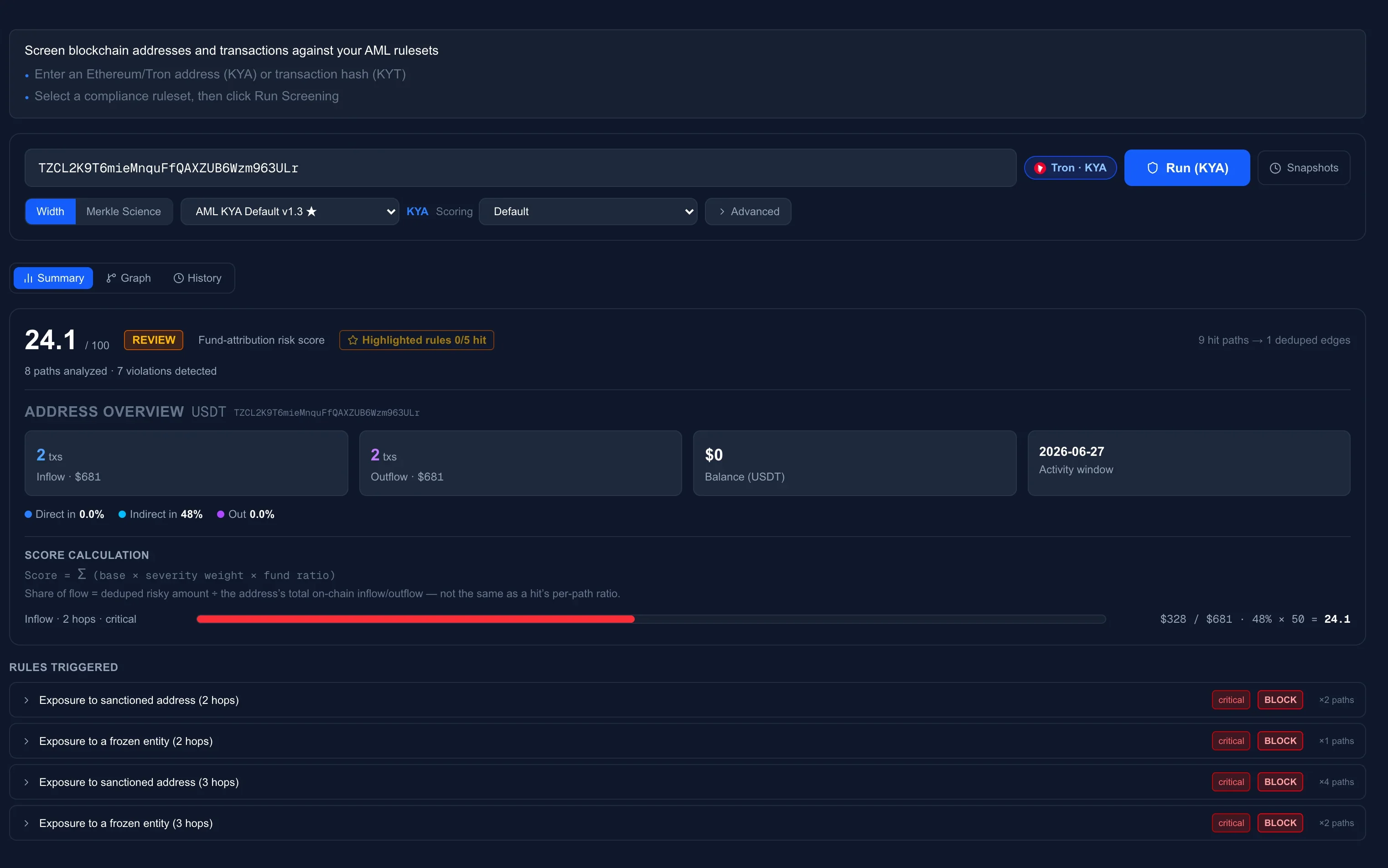
Every hit adds one cell of the matrix — its base for direction and hop band, scaled by the rule’s severity and by the share of the address’s flow the risky money represents. The cells sum to a 0–100 score, and the bands turn it into a decision: Accept, Review, EDD, Block. An address that itself carries a sanctions label scores 100 outright.
Clone the scoring ruleset to move a threshold or reweight a band; the console shows the derivation of every score it gives.
04 · Two ways in
Click Run in the console, or send one curl.
The console and the API run the same engine on the same rulesets and return the same result. Analysts work in the console; systems call the API — one request, one JSON, Chainalysis-compatible with our extensions. Batches go in as a CSV.
curl -X POST https://api.width.live/api/v3/screen/kya \
  -H "X-Api-Key: $DART_API_KEY" \
  -H "Content-Type: application/json" \
-d '{ "chain_name": "Tron", "address": "TZCL2K…3ULr", "inflow_hops": 3 }'{
"risk": "critical",
"riskReason": "Critical: Exposure to sanctioned address (2 hops)",
"score": { "score": 24.1, "verdict": "review", "hitPaths": 7 },
"exposures": [
{ "category": "Sanctions",
"direction": "inflow", "value": 139609 },
{ "category": "Public Freezing Action",
"direction": "inflow", "value": 32197.5 }
],
"highlightSummary": { "rulesChecked": 5, "rulesHit": 0 },
"hits": [ … 7 paths: rule, hops, amounts, nodes … ]
}Sync by default; async returns a job id to poll. Same account, same quota, same snapshots as the console. Read the API docs →
05 · Questions
Six things people ask before they start.
Where does the data come from, and which chains?
Labels and fund flows come from our own on-chain data layer, which attributes addresses to sanctioned entities, exchanges, mixers and other categories and traces transfers hop by hop. The chains and assets a screening accepts are read live from that layer — the console shows the current list.
Read more in the manualHow many hops, and how long does a screening take?
Inflow and outflow depth are set per screening, up to 5 hops each way; the graph grows with every hop, so daily screening usually runs 3 hops in and 1 out. Most screenings return within a minute; deep traces of very active addresses take longer and can run asynchronously.
Read more in the manualCan I change the rules?
Built-in rulesets are read-only. Clone one and the copy is yours: edit any rule, copy a rule into a variant, add your own, mark the ones you care about with a ★ — the engine runs exactly what the editor shows.
Read more in the manualHow does a score turn into a verdict?
Each hit contributes base × severity weight × fund ratio; the sum, capped at 100, falls into a band — Accept, Review, EDD or Block. An address that itself carries a sanctions label scores 100 outright.
Read more in the manualWhat is kept for audit?
Every screening is saved as a snapshot with its request parameters and the complete result — score, verdict, every hit and path. Snapshots are immutable and can be reopened from the console or the API at any time.
Read more in the manualHow do we get access?
Accounts are provisioned by our team for exchanges, payment firms and licensed VASPs. Book a demo and we will set one up; the same account works in the console and against the API.
Read more in the manualLabels and fund flows come from our own on-chain data layer, which attributes addresses to sanctioned entities, exchanges, mixers and other categories and traces transfers hop by hop. The chains and assets a screening accepts are read live from that layer — the console shows the current list.
Read more in the manualRun your next address through it.
A console and an API, for exchanges, payment firms and licensed VASPs. Accounts are provisioned by our team — book a demo and we will set one up.